
An intranet portal is seen as a solution that meets employees’ needs. It improves teamwork, fosters company culture, and supports workflow automation when integrated with enterprise tools. But without a clear understanding of what the intranet portal should include, a company risks designing a product that does not serve its purpose. Learn how to develop a loved employee intranet portal, including key phases, cost, features, and challenges.

Notable intranet portal statistics
Before we break down the steps and details of intranet portal development, let’s take a look at some impressive numbers.
The global market for intranet platforms is growing faster than you might expect. According to the Insight Partners, the global intranet platform market is expected to exceed $17.2 billion by 2034, compared to $7.43 billion in 2025. The growth is expected to be 9.78% over the forecast period from 2026 to 2034.

Global intranet software market size. Source
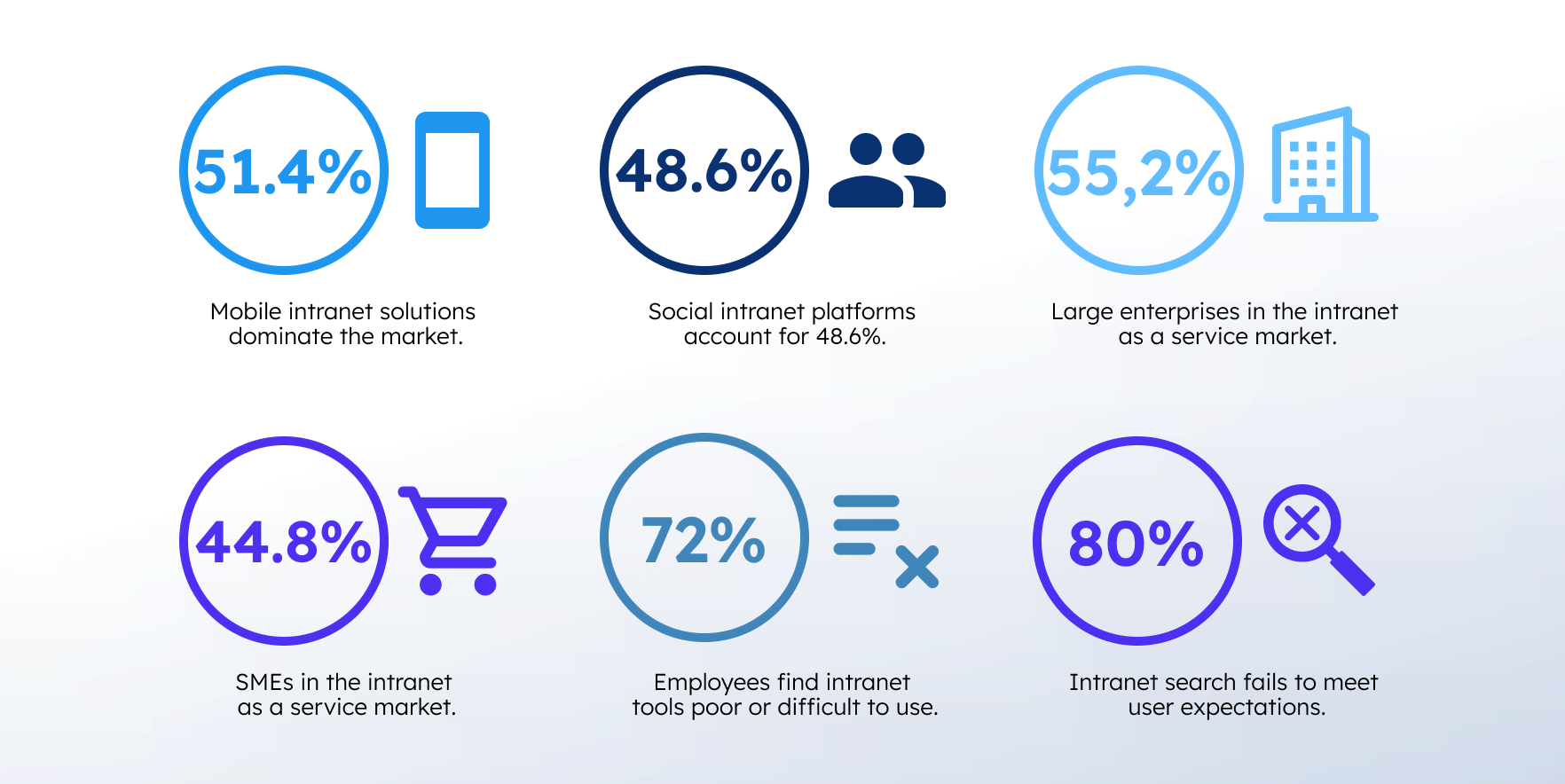
The same report claims that mobile intranet solutions dominate the market with a share of 51.4%, while social intranet platforms account for 48.6%. At the same time, enterprise size plays a significant role in adoption: large companies account for 55.2% of the “intranet as a service” market, while small and medium-sized enterprises (SMEs) hold a 44.8% share.
When it comes to employee acceptance, 72% of employees believe that their company’s intranet tools are poor or difficult to use. Up to 80% of companies face a situation where intranet search fails to meet user expectations. Feature sets also leave much to be desired: only 19% of respondents reported having a precise search feature that uses AI to deliver personalized outcomes. More than half (57%) of users consider poor search functionality the main usability obstacle, followed by unclear navigation (44%) and a lack of personalization (38%).
If we talk about the frequency of intranet use, the number of intranet visits has increased, with 93% of all employees accessing the intranet during the three months. The average amount of time employees spend by using an intranet portal at work each day is 5.85 minutes, which indicates regular adoption across the workspace.
What is an intranet portal?
In contrast with B2B portal, an intranet portal is a private, internal website used by authorized employees to access enterprise resources. Staff can access company news, employee directories, interactive tools, and departmental updates whenever they need to. Organizations provide their teams a secure workspace where employees can communicate, exchange information, and make corporate data easier to find, use, and share – all in one place.
Benefits of an intranet portal
Having a centralized space where employees can access corporate data helps companies structure its workflows with maximum efficiency. Let’s look at the main benefits of an intranet portal across businesses.
Improved communication
By utilizing an intranet, employees quickly receive important messages, updates, and company news, regardless of their location, department, or position. 87% of respondents claim that portals facilitate effective communication.
Enhanced satisfaction and productivity of employees
An intranet portal makes it easier to store, retrieve, and access information at any time and from any device. This boosts employee satisfaction by up to 20% and productivity because they spend less time searching for the documents and tools needed to do their jobs.
Greater knowledge sharing
A portal offers up-to-date knowledge from specialists through a blog, courses, video, and audio resources, where employees can view, share, and manage valuable data. This helps prevent knowledge loss and establishes a shared learning repository for everyone.
Self-service workflows
An intranet can serve as a tool to streamline business processes through self-service experiences, such as submitting requests, obtaining approvals, sharing feedback, and accessing resources. This helps reduce administrative overhead and enhances employees’ productivity.
Better document management
A corporate intranet portal improves and speeds up access to company information. Employees only see what they’re allowed to access, while still making information easier to discover and share.
Eliminated silos
A portal comes equipped with built-in chat apps or can be integrated with necessary third-party applications, which, in turn, lead to strong collaboration across remote teams and eliminates data silos.
Increased employee retention
A company intranet portal improves employee experience by making work easier and faster. Effortless access to corporate information, shared knowledge, communication, and task management tools increases employee retention by up to 87%.
Improved engagement
A well-designed intranet with social interaction, employee recognition, feedback, and personalized content fosters a sense of community and belonging among employees. Hence, it increases their loyalty and engagement.
The role of the intranet in the modern workplace
A modern intranet is no longer just a place to store documents. For many companies, it becomes the operational center of internal communication, collaboration, and knowledge sharing. The real business value appears when employees can complete routine tasks, find information, and communicate without switching between multiple disconnected systems. That’s where companies usually see measurable improvements in productivity and engagement.
At SoftTeco, we use our intranet portal as a centralized workspace for internal communication, project coordination, HR and sales processes, and knowledge sharing across teams. It speeds up access to information and tools by 2x, faster cross-department communication by 50%, and cuts down on administrative tasks.

Main features to include in an intranet portal
The intranet portal is unique to every company; there is a set of main features that every website should incorporate to build strong employee relationships and meet organizational goals.
Integrations
Integration is a mandatory requirement for any intranet portal. They simplify document sharing, improve collaboration, and help employees access everything from a single platform without having to switch between platforms. A powerful intranet portal usually integrates with the platforms and tools that coworkers use day to day, such as Google Workspace, Microsoft Teams, Outlook, or Slack.
With the right integrations in place, employees can complete different tasks from booking vacations and managing documents to tracking project updates and reading company news. The results are improved productivity and streamlined workflows.
Employee directory
The employee directory serves as a centralized resource, providing team members with access to key colleague profiles that contain contact details, department information, and professional skills. Each directory should consist of:
- Employee search. Staff should be able to search for colleagues by name, department, job title, or skills.
- HR system integration. It is necessary to ensure that all personal information remains accurate over time through automatic synchronization with HR databases.
- Organizational structure visualization. A visual organizational chart helps staff members better understand team structures, reporting lines, and department relationships.
- Profile customization. Users should be able to manage their own profiles, including updating bio details, adding new skills, and demonstrating achievements.
Content management system (CMS)
A CMS is used to create, organize, and distribute content within a company. It enables users to efficiently manage various types of materials, including documents, company news, and blog posts, without requiring deep technical expertise. The usefulness of a CMS is enhanced when utilizing a cloud-based intranet environment, like Google Docs, that allows employees to access content from anywhere, on any device. Key essentials of a CMS system are:
- User-friendly interface
- Scheduling of automated publication
- Search and tagging functionality
- Multimedia support
- Access rights configuration
- Real-time co-editing
Social intranet
A social intranet feature makes a corporate portal more dynamic and conducive to communication. Due to functionalities, such as company news feeds, comments, likes, and reposts, employees can interact with one another, discuss ideas, share news, and feel like part of the team. Key essentials of the social intranet are:
- Activity feed
- Comments, likes, and shares
- User-generated content (UGC)
- Recognition and achievements
- Personalized news feeds
- Topic-based channels (e.g., #trends, #technology)
- Event announcements and social updates
Team collaboration spaces
Team collaboration space is a virtual workspace where employees can discuss ideas, work on projects, and cooperate in real time, regardless of their location or time zone. They can do this through chat rooms, video calls, and shared documents. Spaces integrate communication and coordination without the limitations of physical presence. This eliminates obstacles in day-to-day workflows and helps teams stay aligned on goals and progress. Key components of such spaces:
- Shared document editing
- Integrated task assignment and tracking
- Built-in communication tools
- Version control and file sharing
- Mobile accessibility
- Calendar synchronization
- Customizable workspaces
Smart search
Productivity is lost if your employees spend too much time to find information on the intranet. Conversely, an effective search system saves time, reduces the volume of duplicate inquiries and helps staff navigate the vast of corporate data with ease. Smart search maintains your web portal organized, accessible, and user-friendly. When it comes to choose search capabilities, make sure your intranet includes the following features:
- Full-text search
- Searching across documents, employees, and internal policies
- Filtering by department, location, or tags
- AI-driven recommendations suggesting related content
- Search suggestions and auto-complete
- Search history and bookmarks
Notifications and push alerts
A robust notification system ensures instant alerts regarding important updates, guaranteeing that employees receive necessary information in a timely manner. This enables everyone to act in unison and respond promptly to events even amidst a busy work pace. At the same time, balance is critical: too many notifications create noise and reduce focus, while few increase the risk of missing essential data. Key features:
- Real-time alerts
- Multi-device support
- Customization options
Employee recognition system
An employee recognition system integrated into the intranet enables both colleagues and management to acknowledge individual or team achievements. Peer-to-peer recognition, badges, and awards boost employee motivation and team cohesion. Key essentials of such a system are:
- Public and private recognition
- Customizable recognition programs
- Badges, awards, and points
- Integration with intranet social features
- Analytics and reporting tools
Training and elearning tools
Elearning tools hosted on the internal corporate network enable employees to access training materials and courses at any time and from any location. This fosters the professional growth of the staff and helps employees keep up with current industry trends. It is a big perk because workers can focus on the skills most relevant to their roles and career goals. Such platforms include performance tracking, quizzes, and assessments, which help both employees and managers monitor progress over time. Key functionalities:
- Self-paced learning modules
- Interactive content
- Certification and progress tracking
Workspace analytics
Another highly valued feature of an intranet portal is analytics. You should be able to track employee engagement and analyze the results to understand what works best (and what doesn’t work at all). Analytics and reporting tools can track intranet usage, employee engagement, and content performance, while customizable dashboards provide real-time insights for analyzing the following metrics:
- The number of users and sessions
- Number of page visits
- Devices and browsers used
- Most visited pages
- Bounce rate
These KPI metrics allow an organization to identify patterns in intranet portal usage and to create and share relevant content with its staff. Hence, analytics identify areas that need improvement to improve a communication strategy over time.
What is the cost of building an intranet portal?
On average, the cost of building an intranet portal starts from $5,000 and can reach $100,000+ . The final sum depends on project scope, infrastructure, selected features, user numbers, customization, security, and support requirements. For a small business with a limited budget and basic features, such a solution may cost $5,000–$10,000, while for a large organization with more complex requirements and customization, the cost can be $20,000–$50,000+.
Pay close attention to the hosting type. Cloud-based intranets usually have lower initial infrastructure costs, scale more easily, and launch faster, but may require a subscription. At the same time, on-premises solutions require significant upfront investment, dedicated infrastructure, software support, and stronger security requirements. If you want to calculate your intranet portal development cost, feel free to make use of our team calculator.
Intranet portal development cost calculator
Estimate an intranet portal development cost based on your requirements for team size, rates, and timeline with our calculator.
How to create an intranet portal
An intranet portal can be created in two main ways: from scratch or using an out-of-the-box solution. The choice depends on your budget, timeline, complexity and the level of flexibility you are looking for.
Step 1. Determine your business goals
When building an internal portal, it can be difficult to know where to start. The first step is to define the business goals that reflect your company’s needs and to understand how the portal can help you achieve them. The most common goals of companies include:
- Establish proper document and knowledge management
- Ensure smooth business operations
- Manage and support teamwork
- Enhance HR management
- Provide easy access to information and resources
Step 2. Identify intranet users and needs
The next step is to understand exactly who will use the intranet and what they expect from it. Start by conducting surveys and interviews with a focus group to identify employees’ needs, preferences, and pain points. This is critically important, as employees, managers, HR, IT specialists, and senior leadership all interact with data differently and place vastly varied demands on the system.
Next, translate the data you have gathered into user requirements. Determine what information each user group needs to see, which actions they should be able to perform, and what level of access they require.
Step 3. Collect project requirements
This stage determines what the intranet system must encompass in terms of functionality, structure, and technical capabilities. Requirements that you should collect fall into two categories:
- Functional requirements (what the intranet system must do and features it must provide): document management and storage, internal communication tools, and company news.
- Non-functional requirements (define how the system should perform): system speed and performance, usability, user experience, scalability, and security needs.
Afterwards, you need to collect all requirements and prioritize them. Separate must-have features for the minimum viable product (MVP) of the intranet portal from extra ones that will be added later. These steps will help you go away from engineering overload and keep the project within budget.
Step 4. Choose a platform and register a domain name
Selecting the optimal intranet platform depends on the company’s size, industry, employee needs, and budget. In most cases, it’s better to use an existing solution rather than building from scratch, unless you have very specific requirements. They can include full control, deep system integrations, or highly customized workflows. The platform also must be scalable enough to adapt to evolving workflow specifics. Here are some of the available platforms to select from:
- Microsoft SharePoint is one of the most common for corporate intranets, with strong permissions and document management.
- Atlassian Confluence is a web-based workspace used to create, organize, and share project documentation and company knowledge.
- Notion is a simple, flexible website with the main intranet components without breaking the bank.
Look for the following features when creating an intranet portal: customization, prices, integration, mobile accessibility, security and support needs. Once you’ve selected a platform, register your domain name. This will be the address that employees use to access your intranet.
Step 5. Set up security and governance
Modern intranets are cloud-based, centralized hubs filled with corporate and personal information that might be hacked. Therefore, safety is one of the most important aspects you must take care of. There is a set of operations that you should follow when building your portal.
- Implement SSO and multi-factor authentication
- Use end-to-end data encryption
- Add role-based access control
- Regularly update and patch systems
- Monitor and audit activity
- Conduct regular security assessments
- Back up data regularly
- Train internal staff
Don’t forget to establish a data governance framework. It defines who owns content and records, who is responsible for keeping it up to date, how it should be managed, and what standards must be followed to ensure data quality, security, and compliance.
Step 6. Create a user-friendly design
A company’s portal name and design are all about its brand. Employees should relate to it and refer to it frequently. The design should be modern and eye-catching, while also reflecting the company’s style. A poorly built portal with an overloaded element or a cluttered interface will discourage employees from using it. Here are some tips on creating a truly user-friendly design:
- Choose a simple, intuitive user interface
- Make the homepage clean and visually appealing
- Test how your intranet looks on both desktop and mobile apps
- Add social and interactive features
- Incorporate smart search functionality powered by AI
- Put extra thought into navigation
- Use consistent and readable fonts
Step 7. Define information architecture
Intranet information architecture refers to structuring and organizing content in a way that helps employees navigate and quickly find the information they need. Portal structure should include all of the following elements:
- Homepage layout
- Navigation system
- Department sections (HR, sales, etc.)
- Document structure
- Search and content logic
Use metadata (tags, categories, dates) to sort and classify content, thereby making it easier for users to search, filter, and find. Think through scalability. An intranet portal for employees should accommodate future growth as new departments, teams, or content are added.
Step 8. Configure the settings and customize the design
Once your website is set up and ready for use, the next step is to configure its settings and adapt the design to align with your company’s corporate identity. You can do this by navigating to the “settings” tab, where you can modify the site title, logo, color scheme, and other elements. Next, you can proceed to customize the overall design of your intranet. The most effective approach is to utilize a pre-made theme or template. You can also hire a designer to create a unique, custom-tailored theme.
Step 9. Add content and features
The purpose of a portal is to facilitate business workflows. But it is pointless if your employees don’t use it because it lacks relevant information. Having high-quality content increases both the proposed value and employee trust. You need to add content and the required features to your web portal. There are many types of content to include: onboarding support, news articles, company announcements, project updates, or even a directory of contact information. Don’t forget to update the content regularly.
You should also incorporate the core features that make your intranet more useful. Some of them include:
- A search bar
- Filters and tags
- Personal dashboard
- Employee directory
- Task management
- Knowledge base
- Integration with tools
Step 10. Test and launch your intranet
When you are ready to launch the portal, it’s wise to test it with a small group of users to identify potential issues and gather feedback. By doing so, you can verify the website navigation, accessibility, and content organization. Any intranet provider should be able to give you a demo or a free trial to assess the suitability of the software. Afterward, you can tweak the design and content as needed before it is made available to frontline workers.
After this, you can launch your portal across all members within the organization. You need to communicate the purpose and benefits of the corporate intranet to all employees. Provide instructions regarding the portal’s functionality, usage guidelines, and prepare documentation to streamline and accelerate its adoption.
Real-life examples of intranet portals
Businesses, both large and small, rely on intranet portals to streamline their inner processes. These include Google, Microsoft, SAP, Walmart, Shopify, HubSpot, and others. Let’s consider the available, worthy options on the market.
Itelgie: white-label enterprise intranet portal
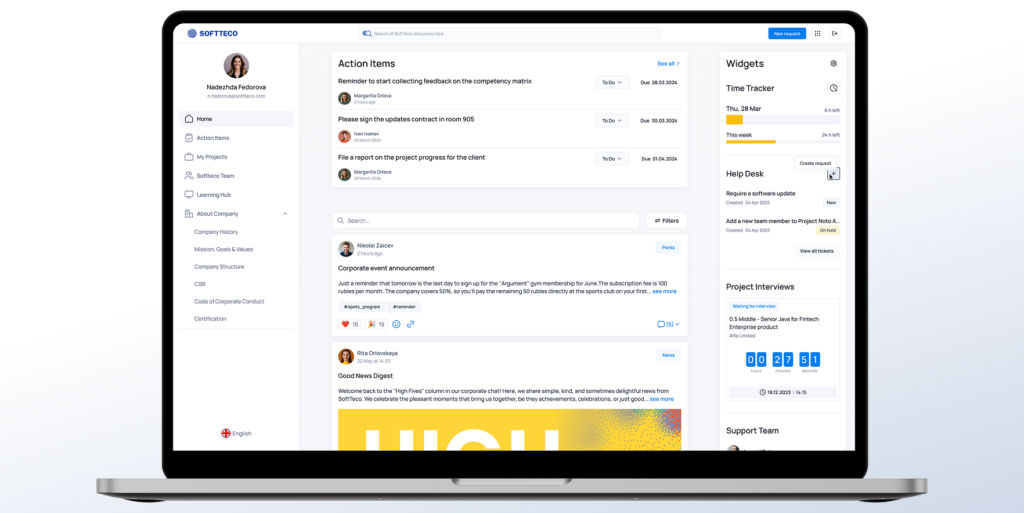
Itelgie is a modern intranet portal designed to unify HR, recruiting, projects, sales, and internal communication into a single system. SoftTeco delivered a robust SaaS platform that can also be distributed as a white-label solution with unique features and integrations. It is used as a central employee hub, where teams can:
- Manage HR processes (vacation requests, employee data)
- Track projects and workloads
- Support sales operations
- Coordinate recruiting and hiring
- Create and improve CVs
- Communicate and share company updates in a workspace
- Access all internal materials and integrated tools
Bringing together all processes in one place, the platform reduces the need for manual tasks, reduces the risk of errors, and enables employees to work more collaboratively and productively across departments.
Itelgie intranet portal
Microsoft SharePoint: corporate intranet portal
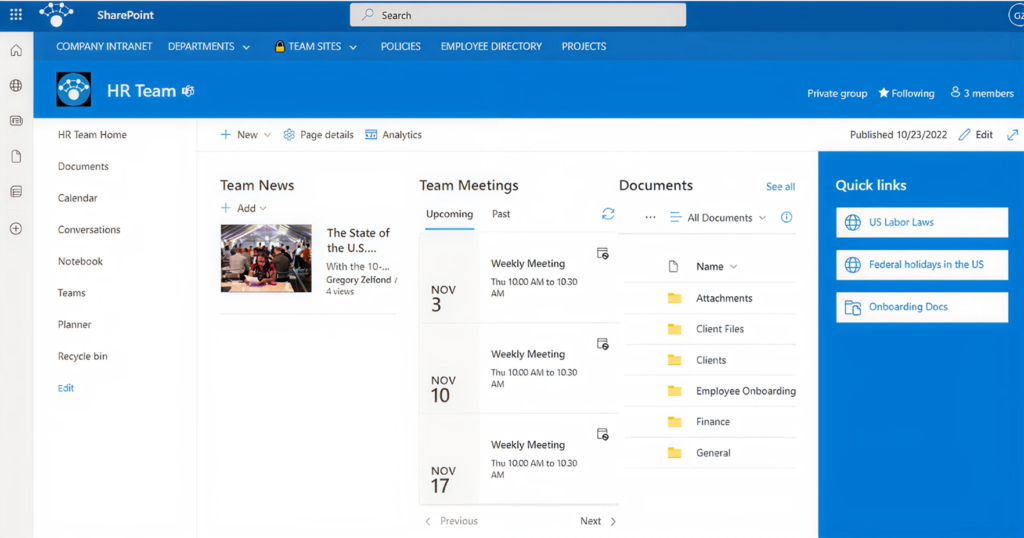
Microsoft SharePoint is a web-based platform designed for employee collaboration and storing, organizing, sharing, and accessing information. It is included as part of the Microsoft 365 suite and integrates with other Microsoft tools, such as Word, Excel, Teams, and Copilot. By using it, employees can:
- Store and manage documents
- Collaborate on files in real time with teammates
- Control access with permissions and role-based security
- Automate workflows
- Search and retrieve data quickly across libraries and sites
Microsoft SharePoint portal
Atlassian Confluence: knowledge-based intranet portal
Confluence is a workspace tool that offers easy onboarding, simple navigation, and works as a central hub where teams can efficiently create, share, and organize data. It integrates with other Atlassian tools like Jira and Trello, facilitating workflow optimization across teams. The platform helps staff to:
- Create and manage a knowledge base
- Collaborate on documents and projects in real time
- Store company policies, guidelines, and docs
- Share updates and meeting notes
- Organize data with pages, spaces, and templates
- Search and quickly access relevant content

Atlassian Confluence intranet portal
ServiceNow Employee Center
ServiceNow Employee Center is a dynamic portal that connects systems across an enterprise into a single destination site. It enables companies to scale their service solutions across departments such as IT, HR, facilities, legal, and procurement from a single website or mobile app. Employees can use it to:
- Search for any information
- Create, submit, and track requests and inquiries
- Complete tasks and submit approvals
- Receive personalized news and notifications
- Access company apps and services via a unified, built-in app launcher
- Automatically initiate and complete end-to-end processes

ServiceNow Employee Center
Pitfalls to avoid when building an intranet portal
When designing an intranet portal, consider possible issues to avoid that may negatively impact the usability and value of your system.
Missed user requirements
The most common pitfall is a lack of understanding of user requirements. The success of an intranet portal depends on users’ acceptance of the system. So, if employees do not see the value in using a company portal, it will be a forgotten tool that nobody uses. Hence, it’s easier to listen to user requirements at the beginning of the development.
Poor navigation
Another pitfall a company may face is poor navigation. If a site isn’t user-friendly and convenient, it can be difficult to find the necessary information. In this case employees are unlikely to use the intranet portal – or not use it at all. It’s important to incorporate vital features (i.e., search bars, drop-down menus) into your internal portal if you want employees to find what they’re looking for.
Irrelevant content
One more reason internal company websites fail is the presence of useless content. Employees typically expect data to help them get work done and find it quickly when needed. However, if the information is ineffective and doesn’t produce results of the search, the risk of employees not coming back to the intranet portal increases. It is important to assign content managers who will be able to keep information relevant and fresh.
Lack of a governance system
Unlike other systems, intranets are often not viewed as business-critical. Consequently, governance issues may be overlooked or addressed too late once the intranet is already in chaos. A useful intranet must be planned and managed from the very outset. Otherwise, it will become ineffective and unused.
Ignoring the importance of measurements
Most organizations launch an intranet portal and consider the project complete. But without continuous monitoring and ongoing improvement, intranet success is hard to assess. To avoid this, you need to define KPIs (user engagement, content reach), use analytics to track them, and gather user feedback to identify strengths and areas for improvement.
Final thoughts
A successful intranet portal transforms how people in organizations communicate, collaborate, and achieve shared goals. Businesses don’t need to stick to certain portal development strategies and templates. Instead, they need to focus on properly selected features, easy navigation, useful content, its management, and a straightforward design. By investing in a strong development team, providing robust technical support, and consistently updating your intranet, you’ll ensure it remains a worthwhile resource over time.
If you need a custom design, a skilled engineer team, or complex integrations for your portal, turn to SoftTeco. We offer web portal development services to help companies build various solutions per their needs, budget and industries. Request a free consultation to get accurate estimates for your system.
FAQ
How to set up an intranet portal?
How to choose the right intranet portal platform?
What is the difference between custom portal development and an out-of-the-box solution?
An out-of-the-box solution offers fast implementation, lower initial costs (especially in SaaS), access to a wide range of features, ongoing updates and vendor support, enhanced security, and no need for extensive in-house development expertise. However, it offers fewer customization options (not all modern solutions), relies on the vendor’s product roadmap, and involves subscription fees.






Comments