
If you are planning an ecommerce app, the first question is usually budget. You need to know what price range to expect, what affects the final quote, and where the money goes before you choose a development team.
The hard part is that an ecommerce mobile app depends on many connected features. Product catalog, search, cart, checkout, payments, user authentication, push notifications, order tracking, and admin tools all need to work together. In more advanced cases, the scope also includes vendor dashboards, warehouse integrations, loyalty programs, AI recommendations, and custom analytics.

This guide breaks down ecommerce app development cost by scope, platform, features, development stages, hidden fees, and budget optimization options. It also includes a simple on-page calculator to help you estimate your project range before asking for a quote.
Key takeaways
- A basic ecommerce app can cost $20,000–$80,000, depending on the number of screens, platforms, and core features.
- A mid-scale ecommerce mobile app often costs $40,000–$180,000, with user profiles, payment gateway integration, product search, push notifications, and an admin panel.
- A marketplace or multi-vendor ecommerce platform can cost $80,000–$350,000+, because it needs specific features like vendor accounts, commissions, payouts, inventory logic, and more complex permissions.
- Enterprise ecommerce app development costs usually exceed $400,000 in annual spend, with ERP, CRM, POS, warehouse management system, loyalty program, personalization engines, and analytics tools integrations.
- The fastest way to control the budget is to start with an MVP, choose cross-platform development where it makes sense, keep checkout simple, and avoid custom logic until it supports revenue or operations.
Why ecommerce app development still matters
Ecommerce is already a stable part of retail, but mobile commerce keeps setting a higher bar for digital experience. Customers expect fast search, clear product pages, simple checkout, flexible payments, order status updates, and support from the same device they use every day.
U.S. Census Bureau data shows that ecommerce sales accounted for 16.9% of total U.S. retail sales in Q1 2026, and ecommerce sales grew faster year over year than total retail sales. This does not mean every business needs a custom app. It means that companies with repeat buyers, mobile-heavy audiences, complex catalogs, or loyalty-driven models may need to provide a mobile experience beyond a responsive website.
The cost question becomes more practical: how much does it cost to develop an ecommerce app that supports real purchases?
Quick overview of how much ecommerce app development costs
The cost to build an ecommerce app depends on what you plan to launch. A simple B2C online store needs a smaller budget than a B2B ecommerce platform or a multi-vendor marketplace.
Ecommerce app development cost usually starts at around $20,000 for a basic MVP and can reach $300,000–$600,000 for a complex marketplace or enterprise ecommerce ecosystem. The final price depends on the app type, platforms, features, integrations, ecommerce platform, design complexity, and long-term scalability needs.
| Project scope | Estimated cost | Typical timeline | Best fit |
|---|---|---|---|
| MVP ecommerce app | $20,000–$80,000 | 3–5 months | Startups, early validation, simple online store |
| Mid-scale ecommerce mobile app | $40,000–$180,000 | 5–8 months | Growing brands, D2C retailers, repeat customers |
| Marketplace / multi-vendor app | $80,000–$350,000+ | 7–12 months | Platforms with sellers, commissions, payouts, and moderation |
| Enterprise ecommerce ecosystem | $400,000–$600,000+ in annual spend | 9–18+ months | Retail chains, B2B ecommerce, omnichannel operations |
These ranges are just estimates. The biggest budget jump usually happens when a project moves from a single-vendor online store to a multi-role platform. Vendor accounts, split payments, product moderation, role-based access, and reporting increase both backend development and QA scope.
What affects the cost to build an ecommerce app?
Ecommerce apps can differ by scope, features, and maturity level. Still, the same core factors usually turn product requirements into engineering effort. Let’s see them below.
Business model
A B2C online store is usually the simplest option. It needs product browsing, cart, checkout, payment gateway integration, order history, user profile, and admin tools. A B2B ecommerce platform costs more because it often needs custom pricing, company accounts, purchase approvals, bulk ordering, saved lists, repeat orders, and ERP integration.
A marketplace or multi-vendor ecommerce app is more complex because the platform serves several user groups at once. Customers buy products, vendors manage listings and orders, admins control platform rules, and the system manages commissions, refunds, and payouts.
Product catalog complexity
A small product catalog with simple categories is easier to build. A large catalog with variants, filters, bundles, stock rules, dynamic pricing, and multi-store availability needs more careful architecture.
For example, one jacket may look like one product to a customer, but in the system it can become many variants with different sizes, colors, SKUs, images, availability rules, and stock levels. Each variant needs to be stored, displayed, filtered, updated, and synchronized with inventory correctly.
This is one of the easiest places to create future rework. If product attributes, variants, inventory, and relationships between products are not modeled properly from the beginning, the team may need to rebuild catalog logic later.
Shopping cart and checkout
Checkout is where ecommerce app cost and revenue risk meet. A basic checkout can include cart validation, order creation, payment capture, and order confirmation. A more advanced purchase flow may include promo codes, gift cards, saved payment methods, split payments, subscriptions, tax calculation, address validation, and delivery slot selection.
Checkout also needs careful UX work. Baymard reports an average documented cart abandonment rate of about 70%, so even small issues in checkout can affect sales. This is why the first version should keep checkout fast, clear, and easy to test.
For more UX recommendations, see SoftTeco’s guide on how to reduce shopping cart abandonment.
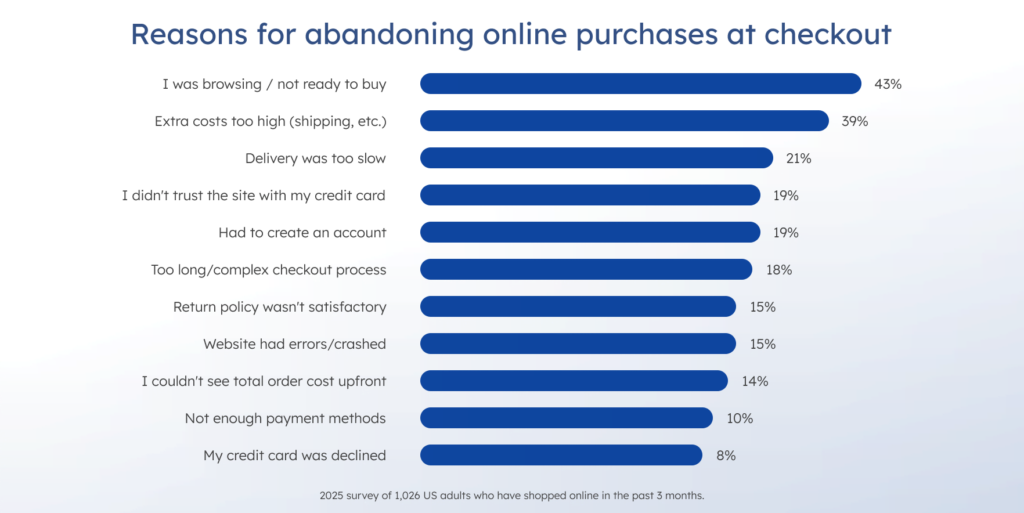
Core reasons for abandoning online purchases at checkout. Source
Payment gateway integrations
Payment gateway integration affects user trust, refunds, fraud checks, compliance, and support. Stripe, PayPal, Apple Pay, Google Pay, Klarna, Afterpay, local payment methods, and bank transfers all add different flows and edge cases.
Each additional payment method increases development and testing effort. If your app serves several regions, payment logic becomes more complex because currencies, taxes, fees, and payment preferences differ by market.
Admin panel scope
The admin panel helps your team manage products, users, orders, payments, discounts, content, and reports. A simple admin panel is enough for an MVP. A multi-role admin panel with permissions, vendor management, analytics, audit logs, and custom workflows adds more time and cost.
This part is often underestimated. A weak admin panel may look fine during a demo, but it creates daily friction after launch. Support teams need a clear order view, while operations teams need product and inventory controls, and finance teams need payment and refund visibility.
Number and complexity of third-party integrations
Integrations are one of the main reasons ecommerce mobile app development cost increases after discovery. Common integrations include CRM, ERP, POS, inventory systems, warehouse management, shipping providers, tax tools, analytics, email marketing, SMS, fraud detection, and loyalty platforms.
The complexity comes not only from connecting these systems, but also from keeping them working smoothly together. Data has to move correctly between platforms, updates need to stay in sync, and failures must be handled without disrupting the customer experience. In practice, each integration often requires authentication flows, data mapping, sync rules, error handling, retry logic, monitoring, and ongoing maintenance.
The more systems the app connects, the more interconnected the architecture becomes. A change in payment, shipping, tax, inventory, or ERP logic can affect checkout, order status, reporting, and customer communication. This is why integrations should be mapped and prioritized before development starts.
Estimate your ecommerce software development cost
Want to understand what your ecommerce app may cost before requesting a quote? Use the calculator to build an estimated project team, choose the required roles, technologies, seniority level, domains, and duration, and get an approximate budget range for planning.
Ecommerce app development cost by business model
The business model is one of the first things that affects ecommerce app development cost. It defines who uses the app, what workflows the system needs to support, and how complex the backend logic becomes.
B2C ecommerce app ($20,000–$180,000)
A B2C ecommerce app is usually the most straightforward option. It needs product browsing, shopping cart, checkout, user authentication, payment gateway integration, order history, push notifications, and an admin panel.
The price grows when the app needs advanced filters, loyalty programs, personalized recommendations, complex promotions, subscriptions, or deep marketing automation.
B2B ecommerce platform ($50,000–$300,000+)
A B2B ecommerce platform is more complex because it has to support business-specific purchasing workflows. This usually includes company accounts, custom pricing, approval chains, bulk ordering, repeat orders, saved lists, and ERP integration. The cost grows further when different clients need different catalogs, prices, payment terms, order limits, and approval rules.
Marketplace or multi-vendor ecommerce app ($75,000–$350,000+)
A marketplace serves several user groups at once: customers, vendors, admins, and sometimes drivers or warehouse teams. Because each group needs its own workflows, the platform must support vendor onboarding, product moderation, returns, role-based permissions, commissions, payouts, and reporting.
This also makes payment and compliance logic more complex. Split payments, vendor payouts, refunds, and dispute handling need careful design and testing. As transaction volume grows or the marketplace enters regulated markets, the scope may expand to seller verification, KYC checks, AML-related controls, tax reporting, and audit-friendly transaction records.
Dropshipping app ($15,000–$150,000+)
A dropshipping ecommerce app can start with a lower development budget if it relies on existing supplier integrations and standard ecommerce logic. The cost grows when suppliers use different catalog formats, shipping rules, product feeds, and stock update methods.
This is where data quality management becomes important. If supplier data is incomplete, delayed, or inconsistent, the app may show wrong prices, outdated availability, or products that are no longer in stock. As a result, users can place orders that the business cannot fulfill.
Ecommerce mobile app development cost by platform
Platform choice affects both the initial budget and long-term maintenance. You can build for iOS, Android, or both. You can also use cross-platform development to launch faster with one shared codebase.
| Platform setup | Estimated cost | What affects the price |
|---|---|---|
| iOS app only | $15,000–$140,000 | App Store requirements, Apple Sign-In, payment logic, device testing |
| Android app only | $15,000–$100,000 | Device fragmentation, screen sizes, Android versions, Google Play requirements |
| Cross-platform app | $20,000–$180,000 | Shared codebase, faster MVP, possible native work for payments or push behavior |
| Native iOS + Android apps | $30,000–$200,000+ | Two codebases, more QA, stronger platform-specific UX |
For many ecommerce MVPs, cross-platform development is enough. It helps teams launch on iOS and Android with less duplicated work. Native development makes more sense when the app needs heavy platform-specific logic, advanced performance, complex offline mode, or deep device-level functionality.
Core ecommerce app features and their cost impact
Ecommerce app cost also depends on the features included in the first release. Some features look simple to users but require complex backend logic, integrations, edge-case handling, and careful testing. This is why the same feature list can lead to very different budgets depending on how deeply each module needs to work.
User authentication
User authentication is the front door to the app, so it needs to balance convenience with security. Common options include email login, phone login, Apple Sign-In, Google Sign-In, password recovery, multi-factor authentication (MFA), and guest checkout.
A simple email-based login flow is relatively inexpensive to implement. However, adding authentication, stronger security measures, or region-specific requirements increases development and QA effort. Businesses operating in regulated industries or multiple markets often need additional safeguards, which can raise costs further.
Authentication is not the place where you should cut corners. A smooth and secure sign-in experience helps build trust and keeps customers coming back.
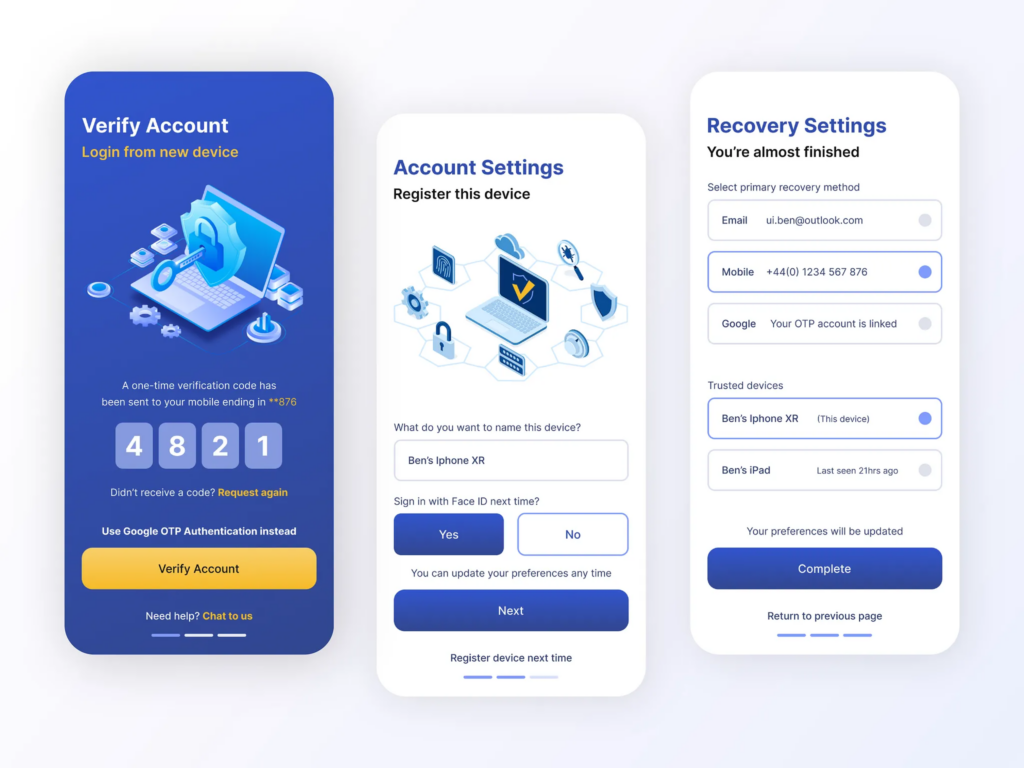
User authentication. Source
Product catalog
The product catalog is the heart of any ecommerce app. Even a basic version includes categories, product pages, images, descriptions, prices, and stock availability.
As the business grows, the catalog often becomes more sophisticated. Features such as product variants, bundles, advanced filters, recommendations, dynamic pricing, stock rules, and support for multiple sellers add significant complexity behind the scenes.
In many projects, catalog architecture becomes a make-or-break decision. Getting it right early helps avoid costly redesigns later. In other words, laying a solid foundation today can save a lot of headaches down the road.
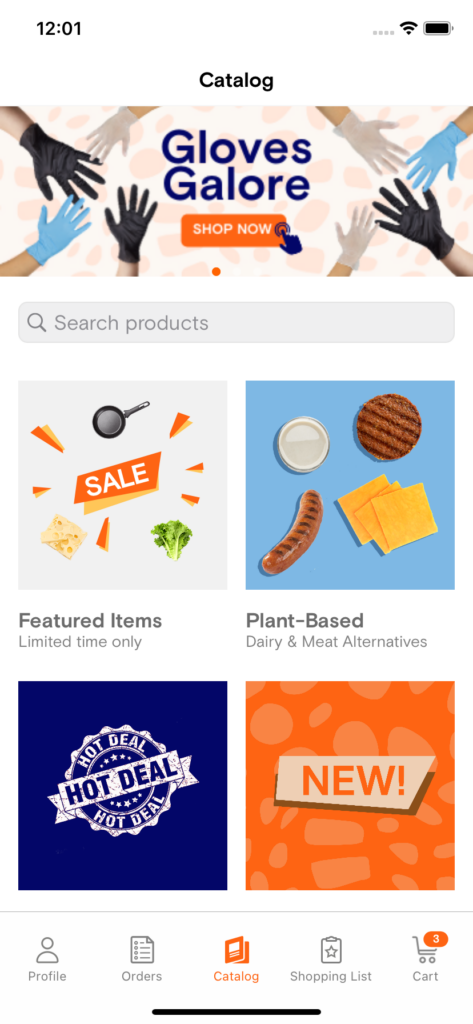
Product catalog. Source
Search and filtering
Basic search functionality may rely on simple keyword matching, but modern ecommerce apps often go much further to allow customers to find products easily.
Searching advanced capabilities can include typo tolerance, synonyms, faceted filters, semantic search, predictive suggestions, AI-powered recommendations, personalized ranking, and search results based on user behavior.
These improvements can have a direct impact on conversion rates because better product discovery means fewer missed sales opportunities. However, they also require additional backend logic, UX design, and data processing. Search may look simple on the surface, but under the hood it can become a fairly sophisticated system.
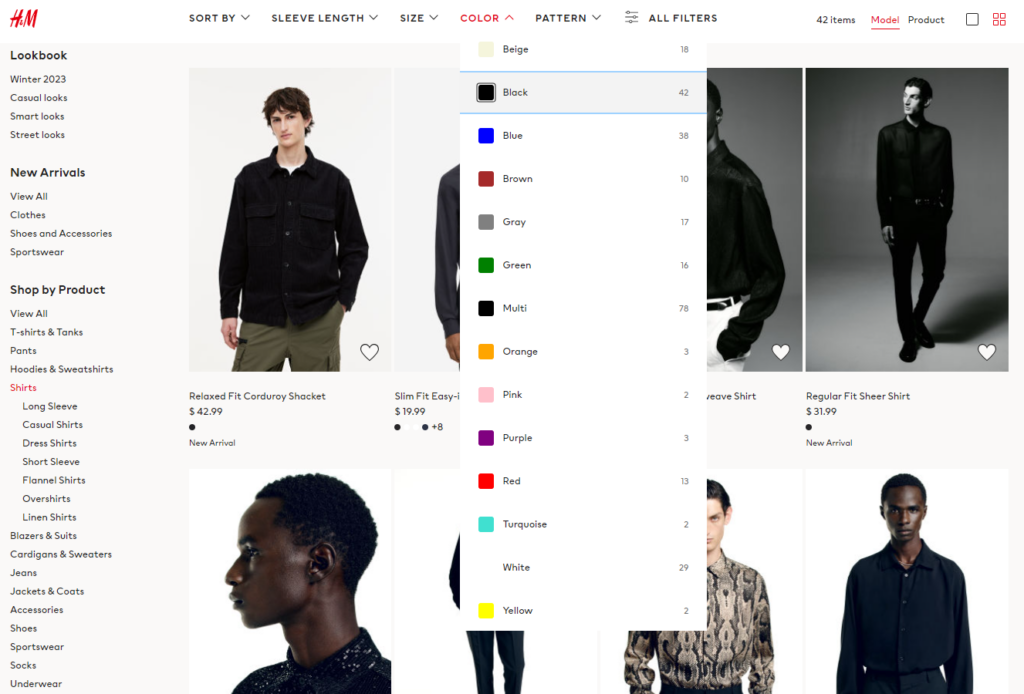
Search and filtering. Source
Shopping cart
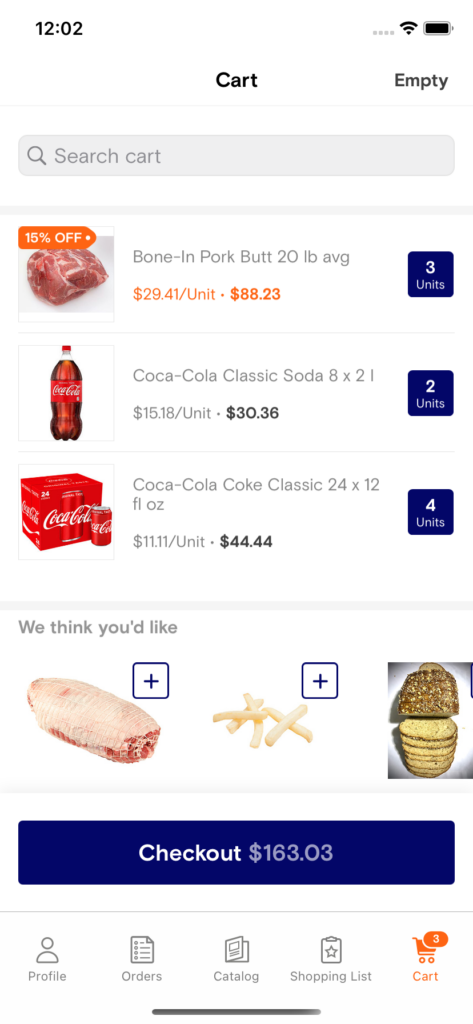
The shopping cart is where browsing turns into buying. At a minimum, it should support product quantities, variants, discounts, taxes, shipping options, and handling of unavailable items. More advanced carts may include saved carts, shared carts, subscriptions, wishlists, or B2B bulk ordering capabilities. Some businesses also need support for promotional campaigns, coupon stacking, or region-specific tax rules.
Customers rarely think about the cart itself, but small cart issues can quickly lead to abandoned purchases and lost revenue. This is why cart functionality needs careful testing across discounts, taxes, delivery options, unavailable items, and payment scenarios.
Shopping cart. Source
Checkout
Checkout is arguably the most important stage of the customer journey. A complicated checkout process can quickly become a deal breaker.
For an MVP, it is usually best to keep things simple and focus on guest checkout, address entry, payment processing, and order confirmation. This approach helps businesses get to market faster and validate demand without overengineering the experience.
As the product matures, you can introduce additional capabilities, including digital wallets, subscriptions, loyalty points, gift cards, split payments, and one-click reordering.
When dealing with this module, remember that a streamlined checkout often delivers better results than a feature-heavy process that overwhelms users.
Payment gateways
Payment functionality goes far beyond accepting credit cards. Integrations may include Apple Pay, Google Pay, refunds, invoices, failed payment handling, recurring billing, and payment status synchronization.
Marketplace platforms introduce another layer of complexity because they often require split payments, vendor payouts, commissions, and dispute management.
Since payment systems directly affect revenue, reliability and security are critical. Even minor issues can disrupt transactions and damage customer trust. For that reason, payment integrations usually demand extensive testing and careful attention to edge cases.
Push notifications
Push notifications help businesses stay connected with customers after app installation. They can be used for abandoned cart reminders, delivery updates, price changes, loyalty campaigns, promotional offers, and order status notifications.
Basic notifications are relatively straightforward to implement. But costs increase when businesses want personalized messages based on customer behavior or when notifications are integrated with CRM systems and marketing automation platforms.
When used wisely, push notifications can become a powerful tool to increase engagement and repeat purchases. However, businesses should avoid overusing them, since too many messages can have the opposite effect and drive users away.
Admin panel
The admin panel is the operational backbone of the ecommerce ecosystem. It can include product management, order management, user administration, discounts, reports, refunds, content management, and role-based permissions.
For scaling businesses, admin panels often expand to include analytics dashboards, inventory controls, vendor management, customer support tools, and workflow automation.
Although customers never see this part of the system, it often determines how efficiently the business runs. A well-designed admin panel lets teams manage daily operations without relying on developers for every product, order, discount, refund, or reporting update.
What to choose among Shopify, Magento, BigCommerce, or custom ecommerce development?
Let’s take a look at popular ecommerce platforms and find out when custom development makes sense.
Custom ecommerce app development
Custom ecommerce app development makes sense when platform limits block your business model. This can include multi-vendor logic, custom B2B pricing, complex fulfillment, subscription logic, unusual product configuration, advanced personalization, or deep integration with internal systems.
Custom development costs more at the beginning but gives more control over architecture, data, performance, and the long-term roadmap.
Shopify development
Shopify development is a good choice for businesses that need to launch an online store fast and manage products, payments, and basic ecommerce operations without building everything from scratch. It works well for small and mid-size stores, D2C brands, and companies that can operate within Shopify’s platform logic.
Shopify also has clear public pricing for standard plans, while Shopify Plus starts at a higher monthly level for larger businesses. The final cost still depends on apps, theme customization, integrations, payment setup, and ongoing support.
Magento development
Magento development suits businesses that need more control over catalog logic, product attributes, multi-store management, pricing rules, promotions, and custom workflows. It can support complex ecommerce operations, but it usually requires more development and maintenance effort than SaaS platforms.
Adobe Commerce pricing is quote-based on the official pricing page. Magento Open Source does not have a license fee, but hosting, customization, extensions, support, and security still translate into significant upfront and recurring expenses.
BigCommerce development
BigCommerce development can work well for growing ecommerce businesses that need SaaS convenience, built-in commerce features, and less backend maintenance than fully custom platforms. It can also support businesses that want to connect several sales channels and avoid managing core hosting infrastructure themselves.
For this platform, the final budget depends on plan selection, theme customization, storefront logic, integrations, and whether the project needs a standard storefront or a headless ecommerce setup.
When custom ecommerce development makes sense
Shopify, Magento, and BigCommerce remain a practical choice for many ecommerce businesses because they help launch faster, keep costs more predictable, and reduce infrastructure work.
Custom development becomes the stronger option when ecommerce is not just a sales channel but part of the company’s core business model. This is usually the case when the product depends on complex B2B workflows, custom pricing, product configurators, multi-vendor logic, subscription models, advanced loyalty, omnichannel inventory, or deep ERP and WMS integrations.
In these situations, a tailored system gives the business more control over architecture, data, performance, and the long-term product roadmap. Before building everything from scratch, it is also worth considering a headless setup, which can provide frontend flexibility while keeping the stability of a platform backend.

Hidden ecommerce app development costs
App store fees
App store fees can affect the financial model if your app sells digital goods, subscriptions, or in-app purchases. Apple and Google both have reduced fee tiers for eligible developers, but the rules depend on revenue, product type, and platform policy. For physical goods, the rules usually differ from digital purchases, but they should still be checked before launch.
Apple’s Small Business Program offers a reduced 15% commission for eligible developers with up to $1 million in proceeds. Google Play also applies a 15% service fee for the first $1 million in annual earnings for eligible developers.
Payment processing fees
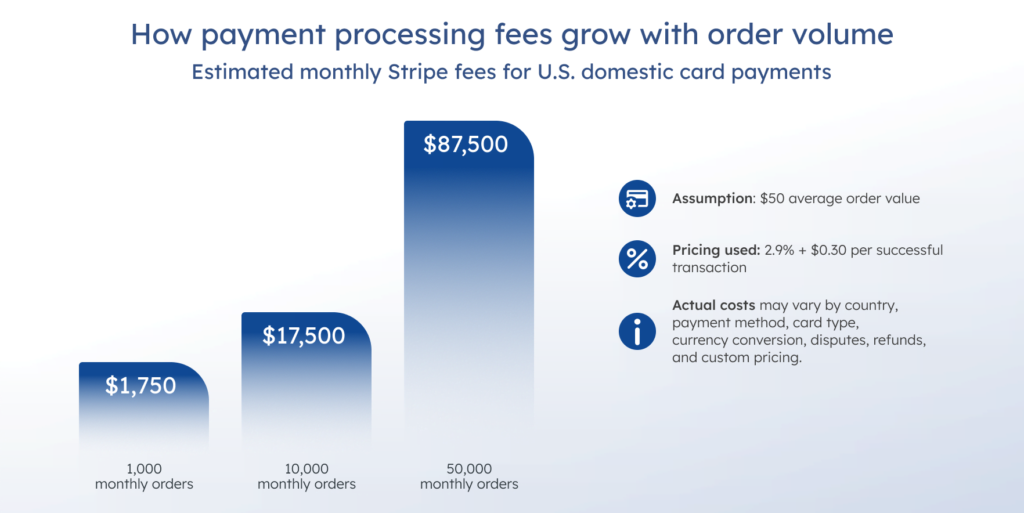
Payment providers charge transaction fees, and those fees grow with order volume. For example, Stripe’s standard U.S. pricing for domestic cards is 2.9% + 30¢ per successful transaction. Other payment methods, international cards, disputes, refunds, currency conversion, subscriptions, and tax automation may add separate costs.
How Stripe fees scale with monthly order volume
At a $50 average order value, Stripe fees would be around $1,750 for 1,000 monthly orders, $17,500 for 10,000 monthly orders, and $87,500 for 50,000 monthly orders. This is why payment processing at scale becomes a meaningful operating cost.
Third-party app and API fees
Ecommerce apps often rely on external tools for analytics, email, SMS, maps, fraud detection, search, tax, shipping, AI features, and marketing automation. These fees may look small at launch, but they grow with traffic, order volume, and automation rules.
Each service has its own pricing model. Map APIs may charge per 1,000 requests, SMS providers charge per message, email tools charge by contact list size or sending volume, and AI APIs often charge by tokens, compute usage, or processing volume. This means that store locator searches, fraud checks, delivery updates, AI-powered recommendations, and automated campaigns can all add recurring costs as usage grows.
Infrastructure and hosting
Infrastructure cost depends on traffic, product catalog size, media storage, search load, and order volume. A basic app may have low hosting costs. A high-traffic marketplace with large media files, real-time inventory, and advanced search needs more careful cloud planning.
For planning, a simple MVP may fit within a few hundred dollars per month for infrastructure, especially when traffic and storage needs are limited. However, this is not a fixed benchmark. Costs increase when the app needs managed databases, larger storage, CDN traffic, advanced search, monitoring, backups, higher availability, or several environments for development, staging, and production.
Maintenance and updates
Mobile OS platforms, payment providers, ecommerce platforms, and third-party APIs change over time. Your app needs updates to stay compatible, secure, and stable. Maintenance is not optional for ecommerce because downtime directly affects revenue.
Compliance and security
Ecommerce apps process personal data, payment-related data, addresses, and order history. Security work may include encryption, secure authentication, access control, PCI DSS-related requirements, GDPR or CCPA readiness, logging, and audit trails. PCI DSS defines security requirements for environments where payment account data is stored, processed, or transmitted.
Why ecommerce app budgets go over plan
In ecommerce app development, budget overruns usually come from uncertainty at the start of the project, not from development cost alone. When requirements are vague, many details appear only during implementation and turn into extra work. Integrations often add more complexity as well, especially when payments, ERP, logistics, tax logic, data migration, security, and compliance are involved. A discovery phase helps reduce these risks before the estimate is fixed. For complex projects, it is also safer to deliver the product iteratively and keep a realistic 20–30% budget buffer for changes.
7 tips on how to reduce ecommerce app development cost
1. Start with an MVP
A strong MVP focuses on the shortest path to a real purchase. For most ecommerce apps, that means product catalog, search, cart, checkout, payment, order history, and basic admin tools. Advanced loyalty, AI personalization, AR previews, and complex marketing automation can wait until the product proves demand.
2. Choose cross-platform development when it fits
Cross-platform development can reduce duplicated effort for iOS and Android apps creation. This works well when the app does not need deep native functionality. It also helps teams launch faster and test market demand before investing in separate native apps. But the trade-off is that some device-specific features may still need native work.
3. Keep checkout simple
A simple checkout flow is easier to build, easier to test, and easier for customers to complete. Start with guest checkout, one or two payment methods, clear delivery fees, and simple order confirmation. Add more payment options later based on user demand.
4. Avoid over-customizing ecommerce platforms too early
Shopify, Magento, and BigCommerce can reduce development work when their native features fit your needs.
Though customization can solve real problems, it also increases cost and maintenance. Before building a custom feature, check whether the platform already supports it through native functionality, an extension, or a lighter integration.
5. Prioritize integrations
Not every integration belongs in the first release, but payment gateway integration is usually essential. ERP, CRM, POS, warehouse, loyalty, and marketing automation can be phased if they are not critical for the first launch.
6. Reuse familiar ecommerce patterns
Ecommerce users already understand common patterns: product cards, filters, cart, checkout, order tracking, and wishlists. Custom design should support trust, clarity, and conversion, not visual complexity for its own sake.
7. Use AI-assisted development carefully
AI-assisted development can reduce repetitive engineering work, especially in testing, documentation, code quality checks, and deployment. But you make the most of it when the scope is clear and outputs are still reviewed by engineers. It should supportdelivery withoutt replacing architecture, security, or product decisions.
As for the numbers, GenAI can improve software engineering productivity by 20–45% of current annual spending on the function. Moreover, developers can complete some coding tasks up to 2x faster; complex tasks are 25–30% more likely to be completed within the given time frame.
Teams should look for a development partner that uses automation to handle repetitive tasks while keeping engineers involved in the work that requires experience and judgment. Faster delivery is valuable, but areas such as architecture, security, code quality, and product decisions still depend on careful human review.
When does an ecommerce app become expensive?
Ecommerce app cost grows fastest when the product needs several business models at once. A B2C store with a simple catalog is manageable. A platform that combines B2C, B2B, marketplace, subscription, loyalty, multi-region tax, multiple warehouses, and custom pricing needs a much larger budget.
The main cost multipliers are:
- multi-vendor architecture
- custom checkout logic
- real-time inventory
- ERP, CRM, POS, or warehouse integrations
- split payments and payouts
- advanced search and recommendations
- multi-language and multi-currency support
- custom analytics and reporting
- high availability and performance requirements
The best way to control the cost is to separate must-have launch functionality from features that can be added after the first version proves demand.
Final thoughts
Ecommerce app development cost depends less on the idea itself and more on the system behind it. A basic mobile storefront can be built within a focused MVP budget. A marketplace, B2B platform, or enterprise ecommerce ecosystem needs a larger investment because it includes more roles, integrations, workflows, and long-term support needs.
Thus, the best approach is to start with a clear scope. Define the business model, choose the right platform, keep checkout simple, and launch the features that support real purchases first. Then use user behavior, order data, and operational needs to decide what to build next.
SoftTeco helps companies develop ecommerce apps, marketplaces, mobile commerce solutions, and platform-based stores on Shopify, Magento, and BigCommerce. Contact us to discuss your project and get a realistic cost estimate.





Comments