
Six years after its peak, grocery delivery remains a convenient option for people who value their time, appreciate flexibility, and prefer outsourcing routine tasks. The existing demand drives businesses to develop their delivery apps to offer curated product categories, serve specific groups, or adopt specific delivery models.
One question remains: how much does it cost to build one?
![Grocery Delivery App Development Cost Overview [2026]](https://softteco.com/wp-content/uploads/2026/06/Grocery-App-Development-Cost-big-1024x513.png)
Key takeaways
- On-demand grocery delivery app development can cost $30,000–$400,000, depending on its complexity, features, business model, and the size of its online customer base.
- Enterprise solutions for supermarket chains or B2B food distributors can cost up to $600,000 and include features such as AI personalization and GPS tracking.
- The high costs of the grocery app stem from the fact that it is not a single app but an ecosystem comprising customer-, admin-, vendor-, and driver-facing apps.
- To reduce costs in food delivery app development, you can start with an MVP, adopt a reusable catalog architecture, and limit platform fragmentation early on.
Why developing grocery app in 2026 still trending
Despite the presence of strong market players like Instacart and Amazon Fresh, grocery delivery app development still matters, though with nuances. While it’s quite unreasonable to create another Uber Eats Grocery, there’s room for competition. You can develop your business in a specific niche or offer a unique operational advantage. So, what’s going on in the market?
The global grocery delivery app market will continue to grow over the coming years. Amounting to $4.3 billion in 2025, it is expected to reach $12.4 billion by 2033. The key market players are complemented by regional startups and specialized aggregators targeting specific areas, demographics, or product categories.
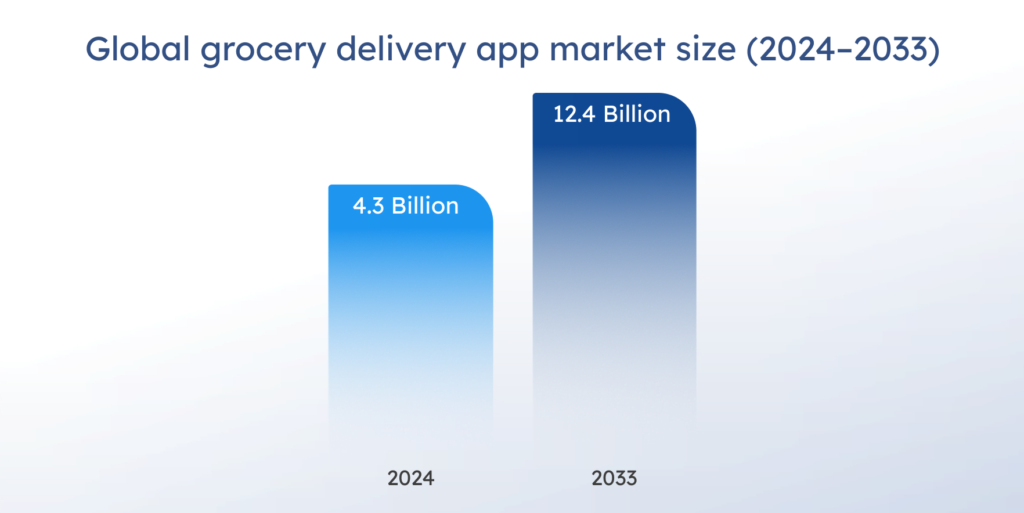
Grocery delivery app market size worldwide. Source
To meet customers’ needs, large delivery platforms now cut delivery time to 10–20 minutes; such orders now account for 15–20% of all grocery orders in cities. The shift became possible through optimized fulfillment chains, real-time inventory systems, and AI-enabled smart routing. For example, predictive analytics can reduce stockouts by 25% and overstock by 15%. At the same time, automated picking systems can make orders 98% more accurate, therefore reducing returns.
Subscription grocery delivery services are also on the rise. Businesses that offer weekly/biweekly delivery slots registered retention rates above 76%, while user adoption rates increased by 48% from 2022 to 2024. Another grocery delivery trend is the integration of QR codes for contactless pickups, which saw 60% annual growth.
Despite all the advantages grocery delivery offers, pricing remains the major customer concern when choosing the service. In the UK, 40% of respondents named high delivery fees as the major adoption barrier. Another study shows similar results, with 35% of interviewees citing unwillingness to pay additional fees as the main reason for not using grocery delivery.
Grocery delivery app development cost breakdown by stage
Let’s see how the grocery app development cost is distributed between the key development phases.
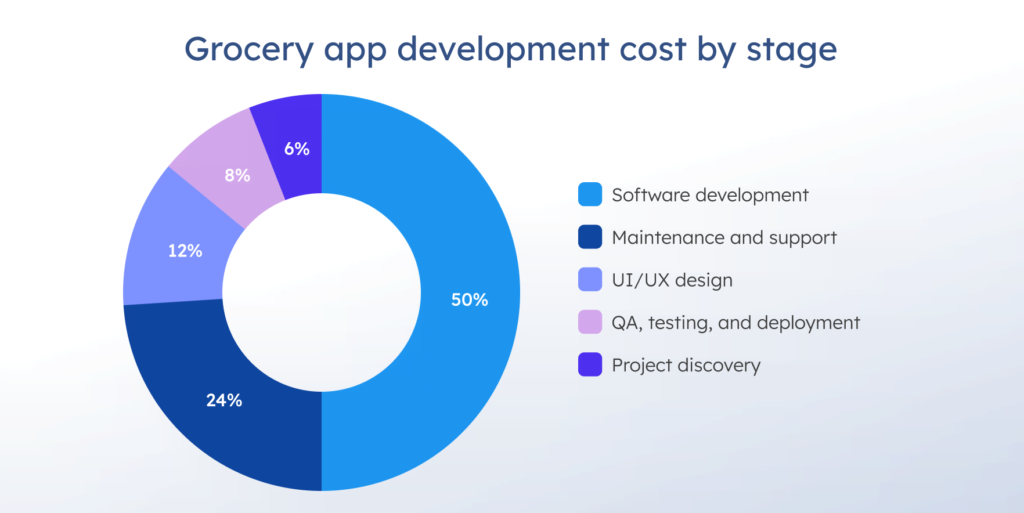
Stage 1. Project discovery ($2,000–$10,000+)
The stage includes competitors’ study, market analysis, product category demand forecasting, and clarification of project requirements. All information is then structured into a strategy and a clear roadmap for future development.
Stage 2. UI/UX design ($5,000–$25,000+)
The designers create wireframes and prototypes for your future app based on typical grocery purchasing behavior. The results are then reviewed through user testing to validate grocery shopping usability early on. A well-designed grocery delivery app can enhance user experience and decrease churn.
Stage 3. Software development ($15,000–$200,000+)
Frontend and backend development includes defining the app’s architecture, integrating third-party services, building inventory/order management systems, and developing fulfillment logic for order picking. At this stage, engineers also implement real-time features, such as live GPS tracking for deliveries, and configure push notifications for users and drivers.
Stage 4. QA, testing, and deployment ($3,000–$20,000)
The stage includes functional and non-functional testing, regulatory compliance checks, security audits, and, finally, deployment to app stores (mobile apps) or the production environment (web apps).
Stage 5. Maintenance and support ($5,000–$100,000/year)
Over time, your grocery delivery apps can accumulate bugs, require updates to keep up with security and compliance rules, and need performance tuning. Regular maintenance ensures that your app remains reliable, fast, and user-friendly after launch.
Designing for recognition and trust
Businesses often underestimate the role of branding and visual identity. Grocery delivery is a highly competitive market where many apps offer very similar functionality. A strong brand concept, distinctive visual language, and intuitive, easy-to-understand user experience can become important differentiators, helping improve both brand recognition and customer retention.
A well-designed grocery app is not the one with the most features – it’s the one that helps users complete a recurring task with the least friction possible while building enough trust and brand recognition to keep them coming back.

Major cost factors for grocery delivery apps
Grocery delivery app development cost is influenced by numerous factors worth consideration.
Business model
The selected business model directly influences the initial investment required, development time, and scaling costs. Loosely speaking, the question is whether you own the inventory, connect stores and vendors with customers, or apply a hybrid model.
1. Inventory-based
This model implies that you own the stock and the warehouses, and manage delivery by yourself. It stands out for its operational complexity, high upfront costs, and considerable scaling efforts. You’ll need a robust backend to support real-time inventory and warehouse sync, keeping your apps’ complex systems in order.
2. Marketplace
Here, you don’t own any inventory. Your app helps connect diverse stores and supermarkets with customers, and you earn profit from small fees on each order placed through your app. The marketplaces can still be niche, like a food delivery service for small businesses. Despite heavy reliance on marketing and high scaling costs, the model requires low upfront investments.
3. Micro-fulfillment
It is a hybrid model that combines inventory control in small fulfillment centers with localized delivery. Products are stored in small warehouses and can be quickly delivered within the local area. When implemented correctly, such a model has a high operational efficiency potential. At the same time, upfront costs remain high due to investments in fulfillment hubs.
Project complexity
Complexity level relies on technology use, architecture choice, design decisions, and the feature set. The rule of thumb is that the more features and integrations you have, the higher the cost to build. There’s a big difference, for example, between single-store and multi-vendor options.
A basic app usually has a limited yet sufficient feature set for smooth functioning. The core capabilities include:
- User registration
- Product browsing with a simple search
- Shopping cart
- Checkout
- Payment gateway integration
The advanced features allow you to go beyond basics, optimize your operations, and improve user experience. They may contain:
- Dietary preference engine
- Dynamic route optimization
- Dynamic pricing
- Natural language search
- Multi-store inventory comparison
| Basic | Mid-scale | Complex | |
|---|---|---|---|
| Estimated cost | $55,000–$165,000 | $55,000–$165,000 | $165,000–$550,000+ |
| Timeline | 2–4 months | 4–8 months | 8–18+ months |
| Included apps | Customer app + admin panel | Customer app + admin + driver app | Full ecosystem |
| Typical features | Product listing, simple search, cart, checkout, basic login, static delivery zones, simple admin panel | Inventory sync, payment gateway, push notifications, basic GPS tracking, coupons, user profiles, improved admin dashboard, basic driver app | Real-time logistics, multi-store support, AI recommendations, route optimization, live tracking, subscriptions, advanced analytics, multi-role system |
Number of platforms/apps
A grocery delivery app is actually a suite of applications that include software for customers, admins, drivers, and vendors. The good news is that you don’t need to develop them all at once. A good starting point is to build a cross-platform customer app and a web app for administration. Creating separate iOS and Android apps is more expensive to build and maintain. Conversely, cross-platform apps may lack platform-native features such as background processing or camera scanning.
| Development setup | Approximate cost | Comments |
|---|---|---|
| Cross-platform app + admin web app | $30,000–$150,000 | Lower development cost due to shared codebase. Faster MVP launch, but may face performance and scalability limitations later. |
| iOS app + Android app + admin web app | $50,000–$350,000 | Higher upfront cost because iOS and Android are developed separately. Better performance, smoother UX, and stronger platform-native integration. |
Integrations
Third-party integrations often become hidden spending traps, and for good reason. A solid grocery delivery app can rely on up to a dozen connections (or more). Payment gateways, mapping services, push notifications, POS systems, and analytics integrations are just a few examples. The costs accumulate from recurring API usage fees and transaction fees per order, as well as from data synchronization, maintenance, and security.
| Integration type | Basic | Medium | Enterprise |
|---|---|---|---|
| Payment gateways | $500–$2,000 | $3,000–$8,000 | $15,000+ |
| Maps and GPS | $1,000–$3,000 | $5,000–$15,000 | $30,000+ |
| SMS and OTP | $300–$1,000 | $2,000–$5,000 | $10,000+ |
| Logistics APIs | $2,000–$8,000 | $10,000–$30,000 | $75,000+ |
| POS and inventory | $2,000–$10,000 | $15,000–$50,000 | $150,000+ |
Discover development team cost for your grocery app
Your grocery app development cost shouldn’t be hit-or-miss. Discover how much your development team will cost in four easy steps.
Core grocery delivery app features
Let’s consider what functionality you actually need to include in each app from your ecosystem. As each feature increases the scope of work, it is vital to know the core essentials from the start.
Customer apps
Client-side apps should be easy to navigate, trustworthy, and stress-free. Ensure the customer can easily sign up/log in, find groceries, place an order, and pay. The standard features are:
- User authentication
- Product browsing
- Catalog and filtering
- Cart and checkout
- Delivery scheduling
- Order history
- Support
- Ratings/reviews
Common mistakes:
- Inaccurate stock status. The customer orders the item “In stock,” only to find it unavailable later. It discourages users from making further purchases and undermines trust. Such mistakes often occur when there are no real-time inventory updates or when inventory is disconnected across multiple sales channels.
- Slow checkout. Every extra second of the checkout time reduces conversions. Ensure you have a few checkout steps, fast payment processing, and a clear delivery fee structure. A good idea would be to introduce a guest checkout option to lower friction.
- Overcomplicated UI. User experience degrades when, instead of speed, clarity, and simple navigation, the customer gets flashy animations or transitions. The main intent for grocery app users is to complete a repetitive task quickly, not to explore, so keep the UI design and app flow clear.
Admin apps
The admin panel is the command center of the whole business, so it must be properly equipped. As it controls users, orders, products, payments, promotions, and operational issues across the platforms, admin apps should include:
- User management
- Product management
- Order management
- Courier management
- Payments
- Discounts and promotions
- Marketing campaign management
Common mistakes:
- No single order view. When information is scattered across multiple systems, tools, and pages, the administrator must run the entire investigation to resolve a single customer issue. It slows operations, puts support agents under pressure, and increases support costs.
- Poor permission system. The issue lives at the intersection of operational and security layers. Finance teams, operations staff, and vendor managers all need different access levels. If everyone has the same permissions, it leads to security issues, compliance problems, and scaling difficulties.
- Manual refund operations. Looking quite manageable at the small scale, it becomes a recipe for disaster at the scale of real grocery delivery. It can take from minutes to days for a person to close one refund ticket. As refunds are sensitive for customers, payment delays create distrust and frustration.
Driver’s apps
Courier apps behave very differently from customer-facing applications. They must include features that align with the conditions under which users work. At their core, drivers’ apps are real-time logistics tools. They feature:
- Delivery requests
- Push notifications
- Map+navigation
- Availability management
- Delivery scheduling
- Work history
- Earnings and reports
- Customer service
Common mistakes:
- Poor GPS optimization. A bad configuration drains the battery quickly, making the app almost unusable for drivers. A driver app is closer to field operations software than a typical consumer app. That’s why it has to withstand weak devices, unstable networks, and long working hours. You don’t often need perfect tracking, but rather a reliable one.
- Delayed order updates. If the driver’s actions don’t sync immediately, it results in missed pickups and duplicate deliveries. The issue can originate from polling, poor backend event handling, or weak mobile sync logic. It can be missed at the testing stage, as QA teams often test in conditions so different from real delivery environments.
- No offline resilience. Parking garages, basements, and dense urban areas limit internet connectivity, which is vital for driver’s apps. Consequently, actions like delivery status updates can fail or be duplicated. A resilient app should automatically retry failed requests, store critical data locally, and handle partial failures to ensure data transmission.
Vendor’s apps
Vendor’s app is a store operations tool. The processes here are task-driven and time-critical, so users expect a lightweight navigation UI, minimal decisions, and guided substitutions. Such apps typically have:
- Item management
- Order management
- Reject orders
- Receive orders
- Coupon management
- Payment tracking
Common mistakes:
- Poor concurrency handling. When multiple people or systems update the same order simultaneously, it’s hard to avoid mistakes. Bad handling causes the system state to become inconsistent, leading to data inaccuracies, lost updates, incorrect order contents, and customer failures.
- Overcomplicated substitution logic. Overdesigned substitution logic slows down the selection process, includes no prioritization logic, and has too many decision steps. A well-thought-out system keeps it to the basics. It includes 2–3 ranked substitution suggestions, automated substitute rules, and one-tap decisions.
- Vendor app as a dashboard view. Vendor app is not another name for admin dashboards or analytics tools; rather, it is a set of live execution tools. The users expect it to help execute tasks under time pressure, not for data analysis. The misconception leads to weak task prioritization, a passive UI, and action buried under insights.
Potential hidden costs in grocery app development
Sometimes, when businesses focus on core cost items like real-time tracking features, inventory management, and multi-store support, the smaller yet vital parts often fall out of focus. Overlooked from the beginning, they can become a huge financial burden over time. Here’s what you need to consider.
- Maintenance. It includes post-launch bug fixes, compatibility fixes, security updates, and performance optimization. Can eat up to 25% of the development budget annually. Nevertheless, regular maintenance is important as the grocery app is expected to run 24/7 with little to no downtime.
- Compliance. It encompasses data privacy compliance, encrypted transactions, secure login systems, and food labeling. As rules change frequently, major adjustments may be needed across the systems; moreover, non-compliance results in legal fines and costly data breaches.
- Cloud infrastructure scaling. If you use cloud computation or storage, the initial costs may be low, but as your business grows, so will your cloud bills. Cloud cost optimization techniques can help you avoid paying for unused resources. The careful planning of cloud use reduces the risk of budget overruns later.
- Payment charges. Payment gateways usually charge a small fee per transaction. As the order volume rises, payment-related expenses also increase. When you add refund processing costs, chargeback fees, and fraud protection tools, the final cost might surprise you. You can limit the number of payment integrations early to control costs.
- Real-time features. Capabilities such as estimated arrival times, driver locations, and instant notifications are expensive to build, scale, and maintain. They consume computation resources, memory, and network bandwidth, directly affecting expenses. To save costs, use real-time features only when they really improve the user experience.
- Cross-platform support. Every OS update will make you update your iOS and Android apps repeatedly to stay compatible. It may include code changes, testing, integration fixes, and compliance updates. Here, the unplanned costs arise not from the development itself, but from the support that follows.
Remember that a seasoned development partner can highlight the key operational overhead at the planning stage. They may also help to prioritize features, decide where real-time capabilities are vital, and select the initial platforms.
Ideas for budget optimization
If you face budget constraints, there’s always room for optimization. Here are some obvious and subtle ways to save a dollar.
Start minimal
Good projects don’t need to start big. Minimum viable product (MVP) development equips you with a marketable solution without enormous upfront investments or a year-long timeline. You can launch quickly, collect feedback, and gradually iterate on improvements.
To get maximum value and avoid overbuilding, you should first prioritize features. You can also minimize SKU complexity in the MVP scope: limit the number of products, standardize units, and keep pricing simple. Characteristics such as regional pricing, substitutions, and dynamic availability create significant edge cases and make the app more complex to build and maintain.
If you want to see advanced technology in your grocery app, it will be useful to separate “must-have” AI features from “investor-demo AI.” In reality, many recommendation/personalization/chatbot capabilities deliver little ROI in early-stage grocery apps.
Limit platform fragmentation
Instead of building the whole suite of apps, you can begin with one simple cross-platform app and one responsive web app. As your business grows, you can then expand to iOS and Android platforms later. Here, a web app serves as a universal baseline that contains core product logic. In contrast, a mobile app serves as an optimized execution layer for user engagement, convenience, and retention. This way, you can reduce total development and maintenance costs and accelerate time to market.
You save money through reduced duplication of development effort (design systems, platform-specific bugs, multiple environments), a lower QA burden, and DevOps simplification. Moreover, limited platform fragmentation means smaller development teams, better project coordination, and faster decision-making – ideal for startups and companies with limited budgets.
Outsource the development team
Software development outsourcing is a proven way to save up to 40% on your budget without sacrificing quality, thanks to lower hourly rates. However, the domain is still shrouded in myths. Some companies still recall their failed outsourcing projects entrusted to unreliable vendors. The thing is, the industry has significantly evolved over the years. The main questions revolve around communication, system design, and product ownership, not whether outsourcing works.
Careful IT vendor selection can bring rare skills, domain-specific knowledge, and flexibility to your project. Moreover, an experienced company may highlight areas where you can additionally optimize spending. They can prevent smaller issues from becoming real problems with real business implications, whether due to conflicting business rules or UX flow gaps.
Design a reusable catalog architecture
Selling groceries and, let’s say, furniture, couldn’t be more different. A grocery app catalog changes frequently: some items are seasonal, while others are fragile or expire quickly; some products belong to multiple categories (for example, almond milk belongs to the beverages and dairy alternatives categories). When ignored from the start, this challenge can add complexity later, leading to additional engineering effort.
A reusable catalog architecture includes characteristics such as flexibility in product attributes, configurable pricing logic, separation of products from variants, and modeling inventory separately from products. It allows for avoiding massive database rewrites, duplicated business logic, and frontend redesigns at the post-MVP stage.
Budget for operational exceptions
While building a grocery delivery app, businesses often miss operational exceptions, such as refunds, substitutions, or failed deliveries. When the order flow deviates from the ideal process, you should be ready for this. Focus on building not a perfect system, but a resilient one. For this, design the system with process outliers in mind so it can handle failures and recover quickly.
Keep the checkout flow simple
Checkout is a crossroad where technical complexity, operational complexity, and revenue risk meet. A simple, three-step checkout pipeline without a real-time dependency chain would be a great choice if you want to save money while still getting reliable functionality. It looks like this: cart validation – order creation – payment capture.
Another budget-friendly tip is to offer simple, widely accepted payment methods. Leave wallets, stored balances, and split payments for further iterations. Start with one payment method per order to minimize financial state tracking inside your system.
Use AI-assisted development
AI in software development lifecycle can accelerate time to market and increase product quality, but cannot replace real human experience and professional judgment for architecture decisions, security review, or domain validation. An experienced software company combines both. At SoftTeco, we implement AI across the software delivery lifecycle, with mandatory output validation, data isolation, and human oversight at the critical points.
In AI-augmented grocery app development, we agree with the client on data exposure to AI tools, code generation usage, use of external AI APIs, and test automation via AI. When used as a supporting tool, AI can lead to better system performance planning, faster design decisions, and fewer coding errors.
Final thoughts
The question “How much does it cost to develop a grocery delivery app?” remains tricky for several reasons. First, the nature of the grocery app itself: it’s not a single app but an ecosystem of customer apps, an admin panel, and drivers’ and vendors’ apps. Second, the cost factors significantly influence the price tag. Third, in times of high competitive expectations, even MVP can mean different things to different people.
Overall, the price for a small grocery delivery app project starts at $40,000. In contrast, enterprise-level apps can reach $400,000–$600,000+, as they include advanced AI features, multiple integrations, and real-time inventory sync. To unravel cost complexities, it’s better to consult an experienced software development partner.
SoftTeco develops on-demand grocery delivery apps, marketplace aggregators, and robotic delivery apps – with the architecture, integrations, and support needed for long-term scaling. Contact us to book a consultation and get a free, non-binding quote on your project.





Comments