
Today, AI-assisted software development goes beyond autocomplete, chat prompts, and isolated code snippets. More teams use systems that can plan tasks, retrieve context, invoke tools, write code, run tests, and continually improve toward a goal. And this shift is called agentic engineering.
The term is not AI development under a new trending name. It is a more structured way to build software with AI agents inside controlled workflows. These agents are systems that use an LLM to make decisions and take actions with tools under defined guardrails, which is a useful baseline for understanding the concept.
If you’re thinking about how AI can help with software delivery, keep in mind that the aim is not to replace engineering, but to lessen repetitive tasks without compromising architecture, review, or accountability.
This article breaks down what agentic engineering means in practice, how it differs from vibe coding, and what best practices teams should consider before adopting it.
What is agentic engineering?
Agentic engineering is a way of building software with AI agents in which people define the goal, constraints, and expected result. At the same time, the system handles more of the execution work. That work can include planning steps, pulling context, generating code, running tools, checking outputs, and refining the result until it reaches the required outcome. The LLM is only one part of the setup, as it can’t dispense with orchestration, memory, tools, evaluation, and human oversight.
In more advanced setups, teams use a multi-agent architecture in which one agent plans, another writes code, and another reviews or tests the output. At that point, ideas like goal-driven execution and environment interaction stop sounding theoretical. They become part of the engineering process.
Think of the system as a perception-action loop: it reads context, takes action, checks the result, and decides on the next step. Sometimes that is as simple as reading documentation and generating tests. Sometimes it involves several agents working across a longer workflow. The key point is that it does not stop after one prompt. It keeps working toward a defined result.
What’s the difference between agentic engineering and basic AI coding?
Simply put, a chatbot can generate code based on a prompt, while an agent system works toward a goal. It can examine a codebase, use retrieval-augmented generation (RAG) to gather relevant context, execute commands, update its state, and go through feedback loops until it creates something useful.
Agentic engineering vs. vibe coding: what’s the difference?
This distinction matters because the two approaches may look similar on the surface, but they serve very different purposes.
Vibe coding is fast, loose, and often useful for experiments. It works well when the goal is to quickly test an idea, build a rough prototype, or get something working with minimal setup. The problem is not the approach itself. The problem arises when teams try to use it like a production engineering model.
Agentic engineering relies on structure. The human defines the goal, sets the boundaries, shapes the context, and reviews the output. The AI agent handles more of the execution work, but it does not replace the delivery process. That is why the source of truth matters. In vibe coding, it is often the latest prompt. In a more disciplined workflow, it is the combination of goals, constraints, specs, context, tests, and review gates.
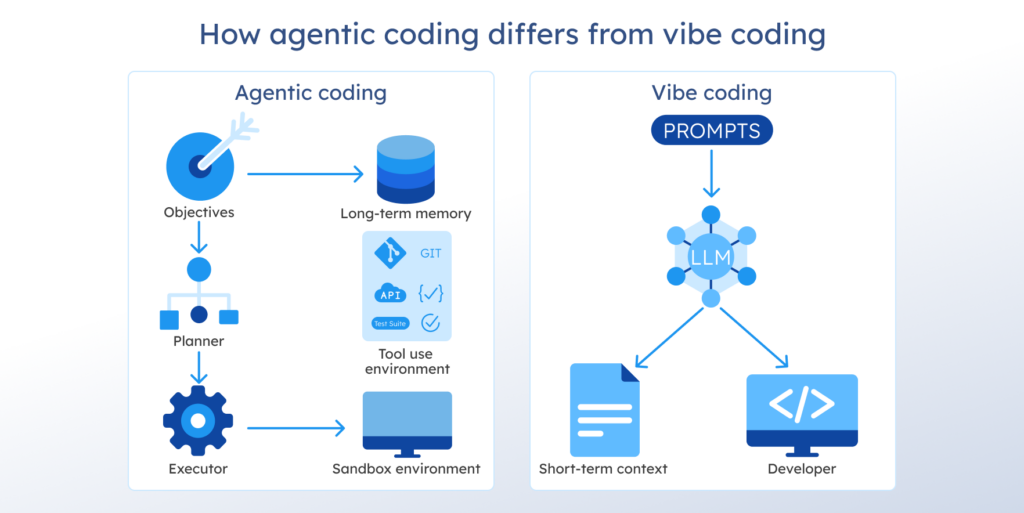
Let’s see the table with a simple comparison to make the difference clear:
| Dimension | Vibe coding | Agentic engineering |
|---|---|---|
| Main purpose | Fast prototyping and experimentation | Structured software delivery with AI support |
| Human role | Prompt, react, accept, or reject | Define goals, review output, and guide the workflow |
| AI role | Generate code or ideas | Plan, use tools, execute tasks, and iterate |
| Source of truth | Prompt and local context | Goals, constraints, specs, context, and tests |
| Testing | Often inconsistent | Built into the workflow |
| Best fit | MVPs, experiments, internal utilities | Production workflows, repeatable delivery, and team use |
| Main risk | Unreviewed output and technical debt | Workflow drift, weak evaluation, and governance gaps |
This is also why prompt engineering alone is not enough here. Prompt quality still matters, but in agent workflows, it becomes only one layer in a broader system. What really matters is whether the workflow can produce results that are reviewable, testable, and stable enough for real delivery.
If your team is still defining where agentic workflows fit and how much complexity they really need, AI consulting services can help you set the scope before development starts.
Agentic vs. spec-driven vs. intent-driven development
When teams start building real AI-assisted workflows, spec-driven development and intent-driven development usually come up next. Both address two common problems in agentic workflows: unclear requirements at the start and drift as the work progresses.
Agentic engineering is the execution model. A team sets the goal, the boundaries, and the expected result. Then the system takes on more of the delivery loop: planning steps, pulling context, generating code, using tools, checking outputs, and continuing until it reaches a usable result. The main question here is simple: how does the work actually get done?
Spec-driven development is a planning and control approach. It puts the spec at the center before execution starts. Your team documents the requirements, rules, acceptance criteria, and expected software behavior in a structured format. That spec becomes the main reference point for both people and agents, cutting ambiguity early on. So, you get fewer wrong turns and fewer cases where the system delivers something that technically works but still misses the point.
Intent-driven development is an alignment approach. It focuses on preserving the task’s original meaning as the work progresses. In real projects, intent often gets diluted between prompts, edits, iterations, and handoffs. One person asks for one thing, the system produces something slightly different, and after a few cycles, the output drifts even further from the original need. Intent-driven development tries to prevent that. Its role is to keep the real purpose, priorities, and constraints aligned as the work evolves.
A comparison table below makes the difference easier to see:
| Approach | Main focus | What controls the workflow | Best when | Main risk |
|---|---|---|---|---|
| Agentic engineering | Execution | Goals, guardrails, tools, and human review | You want the system to handle more of the delivery loop | Weak control over outputs, tools, or workflow state |
| Spec-driven development | Clarity before execution | A structured spec with requirements and acceptance criteria | Precision matters, and ambiguity is expensive | The spec is too weak, outdated, or disconnected from implementation |
| Intent-driven development | Alignment during execution | Preserved intent, context, and decision logic | The work tends to drift across prompts, iterations, or handoffs | The system stays technically correct, but moves away from the real goal |
Strong teams do not pick just one approach. They combine them. They use agentic workflows to advance more of the implementation work. They use specs when they need precision. They use intent as a control layer, so prompts, context, and code stay aligned as the work evolves.
If your main problem is speed, focus on agentic engineering. If it’s ambiguity, focus on spec-driven development. If you’re facing the drift between what you asked for and what the system keeps producing, opt for intent-driven development. That is usually the clearest way to decide where each approach fits.
6 real-world use cases of agentic engineering
The best use cases for agentic engineering usually involve work with several steps, tool use, and clear checks at the end. That is where agent-based systems make sense, because they can read context, choose the next action, and keep the process moving. See the examples below:
Software engineering workflows
Software teams can use agents in work they already know well: code review, routine code changes, testing, and implementation support. These tasks are often repeated, but they still require judgment, validation, and access to tools.
In their turn, AI agents help most with the routine part. They can review files, suggest edits, support refactoring, check changes, and shorten the time between updates and reviews.
Multi-step research and internal knowledge work
In research processes, the system has to collect context, search across sources, compare findings, and return something more useful than a quick summary.
Agents stand out from basic chat tools here, as they can break the work into steps, use tools, and keep going until they produce a grounded result. The same logic applies to internal knowledge work, where teams need grounded research, structured synthesis, or context drawn from many systems before a person makes the final decision.
Customer support and service operations
Customer support is one of the clearest business-side use cases that are high-volume, repetitive, and easy to measure. Support teams usually handle routing, context retrieval, policy checks, handoffs, and tool-based actions daily. These are the tasks where agents can reveal their value.
An agent can take over the routine part of these tasks. It can sort incoming requests, pull the right context, and pass complex cases to a person. That saves time and helps your team focus on the cases that actually need human judgment.
You still need strict controls here to ensure that AI agents provide accurate answers, respect permission boundaries, and follow clear handoff rules.
Sales and revenue operations
Sales operations are a good use case for agentic systems because the work usually follows a clear process. A sales team often needs to fill in lead data, qualify inbound requests, update CRM stages, assign the next owner, schedule follow-ups, send reminders, and log every action in the pipeline. These are repeatable steps that an AI agent can easily perform.
An agent can gather context, update the CRM, notify the appropriate person, log the action, and forward the case when needed.
Document-heavy and compliance-sensitive workflows
Another strong use case is document-heavy work that includes forms, policies, approvals, and supporting documents. For example, a team may need to review a vendor onboarding package, check tax forms and signed agreements, confirm any missing approvals, and ensure the file moves through the correct order. This kind of work is structured, but it still takes time and close attention.
A simple automation script often breaks here because the process is too long and too conditional. However, agents perform better when the rules are clear. They can read the document, extract the needed data, flag issues, route the case, and keep the process moving. You still control the workflow because you define the path that AI agents follow to complete tasks.
Cross-system internal operations
Some tasks look simple until you see how many systems they touch. Think about onboarding a new employee. HR enters the hire; IT has to create accounts and prepare equipment; finance needs payroll details; and the manager needs access requests approved. Each step is manageable on its own, but there are friction points between the systems and the teams.
AI agents can help move that process forward. They can pull the new hire’s data from the HR platform, trigger the IT ticket, update internal records, and notify the next team when a step is complete. This matters most in larger organizations, where a single process often spans four or five tools and several approval points. A good setup keeps the workflow moving. A weak one creates duplicate records, missed steps, and extra follow-up.
To sum up, the same pattern keeps showing up across these examples. Agentic workflows work best when the process has several steps, depends on context, and moves through connected tools or systems. They also work best when the output is still easy to check, either through clear rules, human review, or both. In other words, the task is too involved for a simple rule-based automation but still structured enough to keep under control.
A simple, fixed process usually does not need an agent, as standard automation is often enough. But when the work depends on context, decisions, tool use, approvals, and transitions between steps, an agent usually becomes the better fit.
Top 8 proven benefits of agentic engineering
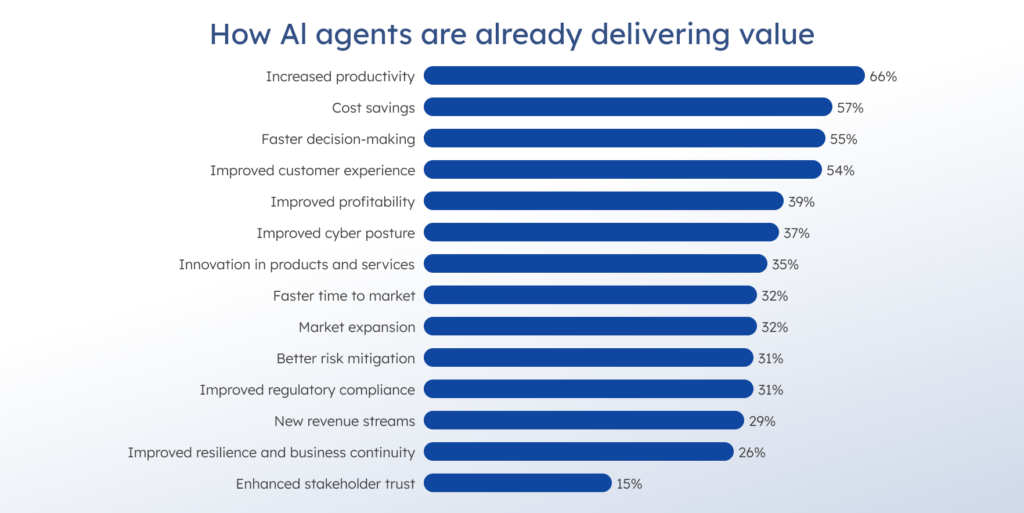
PwC’s AI Agent Survey. Source
Lower service costs and faster case resolution
Customer service is one of the few areas where the public numbers are already concrete. In contact centers, AI agents have driven a 50% reduction in per-call costs while improving customer satisfaction. That is a strong benchmark because support work includes routing, policy checks, context retrieval, and escalation paths, which are exactly the kind of multi-step flow agents handle well.
Faster path from pilot to real rollout
Agentic engineering can also shorten the time between testing an idea and using it in real work. In one industry framework, companies with a stronger setup for AI agents moved beyond pilot projects in about 5.9 months, while less prepared teams took about 15 months.
When your team has clear workflows, ownership, guardrails, and review points, you can move from experiments to production much faster.
Faster research and development
In research and development, these systems help teams process more data and move through complex decisions more quickly. For example, Insilico Medicine’s AI platform delivered 35% lower costs, reached ROI in 9 months, and had 79% accuracy in predicting phase II clinical trials. That kind of result matters because faster analysis can shorten drug discovery and clinical trial work.
Better decision quality in multi-step workflows
The survey found that 69% of executives named improved decision-making as the top benefit of agentic AI systems. That matters in workflows where the system must gather context, choose the next step, and keep the process moving without waiting for manual handoffs at each stage.
Quicker document review with fewer billable hours
Legal and compliance teams often spend hours on large sets of contracts, policies, and supporting documents. In one legal workflow, the platform increased review speed by 40% and reduced clients’ billable hours. This is a clear example of how agentic systems cut time in document-heavy work while still leaving room for human review.
Lower IT support costs
IT operations are another strong benefit. Microsoft reduced IT support costs by 20% and improved system uptime by 15% by using AI to monitor systems, predict failures, and automate support workflows. The value here is easy to see. Teams spend less time on manual support work, and core systems stay available for longer.
More revenue from sales workflows
Sales is another area where the upside is visible. In one multi-agent sales setup, prospecting efforts doubled within three to six months, contributing to a 40% increase in order intake. This is a useful example because it shows that agents do more than save time. They can also help revenue teams move more opportunities through the pipeline.
Lower logistics costs and faster delivery
In logistics, these systems can improve both cost and speed. DHL showed a 15% drop in operational costs and a 20% improvement in delivery times. That is a strong business result because the gains show up in daily operations.
Biggest risks to avoid in agentic engineering
Even though agentic systems can save time, they can fail in ways that are hard to spot if you build them too quickly. Let’s consider the biggest risks.
Weak goals create weak results
With a vague task comes a vague result. If your team gives the system weak context, loose instructions, or too much room to decide on its own, it can move quickly and still miss the point. This gets worse when nobody checks the output until the final step.
Stale context leads to wrong decisions
Agents only work as well as the context they get. In real teams, ownership changes, standards move, dependencies shift, and docs go out of date. If the system relies on outdated information, it can make the wrong choice for the right-looking reason. The output may still look plausible until someone checks the details.
Too much tool access creates bigger failure points
Once a system can fetch data, run code, call APIs, or update records, the cost of one wrong step rises quickly. You need clear limits on what it can do, where it can act, and when a person has to approve the next step. The more tools you add, the more control you need.
The common agent design mistake that slows everything down
Many teams make the same mistake early on. They give one agent too many tools and a goal that is still too vague. Imagine having thirty tools and a huge prompt. Then they wonder why the system starts picking the wrong tool, mixing up similar ones, or inventing tools that do not even exist. The bigger the toolset gets, the harder the choice becomes.
The tool descriptions also eat context and slow the whole flow down. A better pattern is to split by domain. One agent works with the database. Another handles email. A third works with files. You can also dynamically narrow the toolset to expose only the tools that matter for the current task.

Integration sprawl turns into hidden debt
This problem builds slowly, then lands all at once. One team connects an agent to CI, another to cloud tools and repos, and a third to help desk systems and internal data, each with different credentials and scopes. Similar systems behave in completely different ways because each team wired its own version. Then one API changes, and several teams spend time fixing the same class of bug on their own.
Poor visibility makes failures harder to catch
Many teams focus on what the system can do. Fewer think hard enough about how they will track it. Once the workflow grows, you need to know what the agent did, which tools it used, what data it touched, and where it went wrong. Without tracing, feedback loops, and evaluation, debugging slows down, and trust drops quickly.
Agent sprawl creates duplication and weak ownership
This problem shows up fast. One team builds an agent for triage. Another builds something similar because they do not know it already exists. A third connects the same idea to different tools and permissions. Soon, you have overlapping systems, duplicate work, and no clear answers to basic questions such as who owns the workflow, which version runs in production, and which one should be treated as the source of truth.
More agents mean more complexity
Multi-agent setups can look powerful, but they are harder to debug and harder to trust. More agents mean more states, more transitions between steps, and more chances for the workflow to drift away from the real task. That is one reason experienced teams usually start small.
Frequent use without clear review rules creates a workflow gap
Low trust is not the problem on its own. Some caution helps, as developers still read the output closely rather than accepting it on autopilot. The bigger issue arises when teams use these systems every day yet lack firm rules for verification, ownership, and review. Then the usage of agents rises, but some of the time savings disappear. The teams spend too much time checking, fixing, and retesting work that looks close but still is not ready.
Teams use agents where a simpler tool would work better
Not every task needs an agent. In some cases, a fixed automation flow or a short script does the job better. If your team reaches for an agent too early, you add more setup, more failure points, and more overhead than the workflow actually needs. That is one of the easiest ways to make the system heavier without getting much value back.
If budget, infrastructure, and rollout complexity are part of the discussion, this guide on AI agent development costs provides a more detailed breakdown of the factors that shape the final investment.
Security gaps turn agent workflows into real attack surfaces
In SailPoint’s research, 96% of technology professionals said AI agents are a growing security risk, yet only 44% of organizations reported having policies in place to secure them. That gap matters. Agents often operate with broad access and limited visibility, and 23% of organizations said their agents had already been tricked into revealing access credentials. If governance, access control, and auditability are weak, an agent can make mistakes. It can also expose sensitive systems and data.
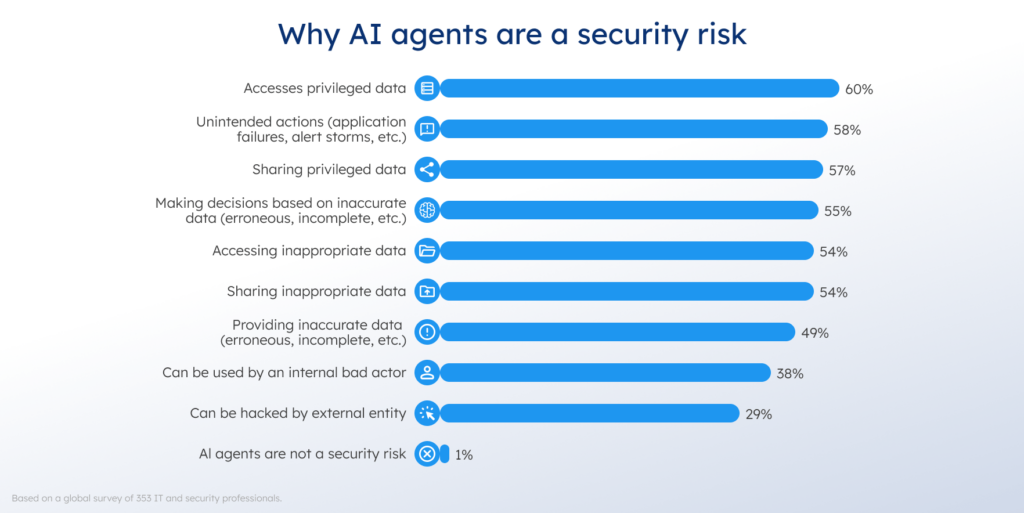
AI agents: The new attack surface. Source
Why AI agents get expensive in production
One thing teams often underestimate is what happens in production. On a prototype, an agent may finish in five steps and cost almost nothing. In real use, the same flow may take fifty steps, and the cost jumps fast. Latency becomes a problem, too. People will not wait forty seconds for a response just because the workflow looks smart on paper. Budget limits, token limits, and step limits need to be there from the start. If you leave them for later, you usually pay for it.
Agentic engineering best practices
1. Start with one agent and one narrow workflow
Start small. If the task is well defined, use the lightest setup that can do the job. In many cases, one agent is enough. Sometimes, one strong LLM call with retrieval is enough.
This makes the system easier to test and easier to trust. It also makes the workflow easier to maintain as your team changes prompts, tools, or rules.
In many cases, the best first step looks a lot like an MVP, which is why developing an MVP is often the right starting point for testing a narrow agent workflow.
2. Keep tool access narrow and explicit
Do not give the system a long list of tools and expect it to choose the right one. Give each tool one job. Define what goes in, what comes out, and where the system has to stop.
This makes the workflow easier to control. It also makes debugging much easier when something goes wrong. If the agent has too many options, the system becomes harder to predict and harder to review.
3. Add a review of the risky steps
Some steps need human approval. If the workflow can update records, call external services, trigger actions, or affect customers, money, or production systems, put a review point there.
That is where human oversight matters most. You do not need approval on every step. You need it on the steps where a single wrong action can cause real damage.
4. Trace every run and evaluate the output
You need to see what the system did, which tools it used, what it returned, and where it failed. If you cannot see that, you are debugging from the outside.
Tracing and evaluation give you that visibility. They help you understand if the system improved after a change or just started failing in a different way. Without that layer, the workflow quickly becomes harder to trust.
5. Use multi-agent setups only when the work truly splits
Some workflows benefit from specialist agents; others do not. Add more agents only when you have a clear reason, such as separate roles, different tool access, or a workflow where one agent gathers information, another analyzes it, and a third reviews the result.
If you add more agents too early, you increase state, transitions between steps, and overhead. The setup would look more advanced, but keep in mind that the workflow often becomes harder to manage and yields little in return.
6. Build complexity only when the simple version stops working
This is the main rule behind it all. Start with the smallest setup that solves the task well. Keep the workflow visible. Keep ownership clear. Add more only when the simpler version no longer holds up.
The best way to build your first agent workflow
A good start is narrow and measurable. Pick one task where success is easy to judge. Before you build the agent, prepare an evaluation set with 20 to 50 real examples. Then start with the smallest loop that can do the job: one model and two or three tools. That is usually enough to show where the system breaks. Once you throw 30 tools into the mix, it gets much harder to tell what failed first: the agent logic, the tool description, or the interaction between them.
AI usage today in numbers
- Speed. In one agentic AI deployment, an automotive supplier reduced the time required to prepare initial test case descriptions by 50% for certain types of requirements.
- ROI and service efficiency. A Forrester TEI study on AI agents for customer service reported 396% ROI, a 35% case deflection rate, and a 50% reduction in case handling time.
- Adoption trend. 33% of enterprise software applications will include agentic AI by 2028.
Tools for agentic engineering
To start with agentic engineering, you need an agent runtime, a tool-calling layer, state management, and tracing for each run. The right choice depends on how much control your workflow needs. Here’s the list of the core tools that will help you get started:
OpenAI Agents SDK
This is a practical starting point for tool calling, handoffs, state, and tracing in one place. It supports agent workflows that use tools, pause for human review, and keep track of results across a run. That makes it useful when you want to move beyond chat-style experiments and build a more controlled execution flow.
LangGraph
LangGraph fits better when your workflow needs a long-running state and tighter control over execution flow. Its main value is durable, stateful execution for workflows that may branch, pause, resume, or recover after interruption. That makes it a strong choice when one run needs persistence and more explicit orchestration.
CrewAI
CrewAI is a better fit when a single workflow requires multiple agents with different roles. For example, one agent can collect information, another can process it, and a third can review or route the result. The framework is built around this kind of setup, with support for agent coordination, shared context, memory, guardrails, and observability. Use it when a task is easier to split among several agents than to handle in a single long flow.
Microsoft Agent Framework
The framework is a stronger fit when your team needs tighter workflow control inside larger internal systems. It supports graph-based workflows, shared state, checkpointing, telemetry, and human review. That makes the Microsoft Agent Framework a good choice for production use, where a single workflow spans multiple tools and approval steps.
How to choose the right tool?
Start with the smallest setup that can do the job well. If your workflow is narrow and easy to verify, a lightweight runtime is often enough. If it has a long-lived state, several workflow transitions, or strict review points, you need stronger orchestration and better tracing.
The choice also depends on how much control you need over the workflow itself. Some teams need a simple runtime for one agent and a few tools. Others need a durable state, checkpoints, shared context, and clearer control over how work moves from one step to the next. The tool matters, but the fit matters more.
Conclusion
Agentic engineering helps your team with work that is too complex for fixed automation but still structured enough to control. That usually means several steps, changing context, tool use, and clear review points. In those cases, agents can reduce routine effort, accelerate work, and help teams make better use of senior time.
You must set clear goals, clear limits, and clear ownership to use agents properly and avoid common mistakes. If your workflow is simple, a script or standard automation is often enough. If your workflow requires context, decisions, and handoffs, agentic engineering is a serious option that fine-tunes your software delivery.
Here’s the main idea behind all of this. Start with one real problem, one clear workflow, and one clear way to measure the result. Keep people involved where the cost of a wrong step is high, and add more tools, steps, or agents only when the simpler setup is no longer enough. Agentic engineering brings real value when it helps solve the right problems in the right order without making the workflow heavier than it needs to be.




Comments